


A salary in hand calculator helps employees estimate the actual amount they receive after deductions, including the Provident Fund (PF), Professional Tax (PT), Employee State Insurance (ESI), income tax, and other payroll-related deductions. While a job offer might mention a Cost to Company (CTC) figure, the amount that actually goes into an employee's bank account is often quite different.
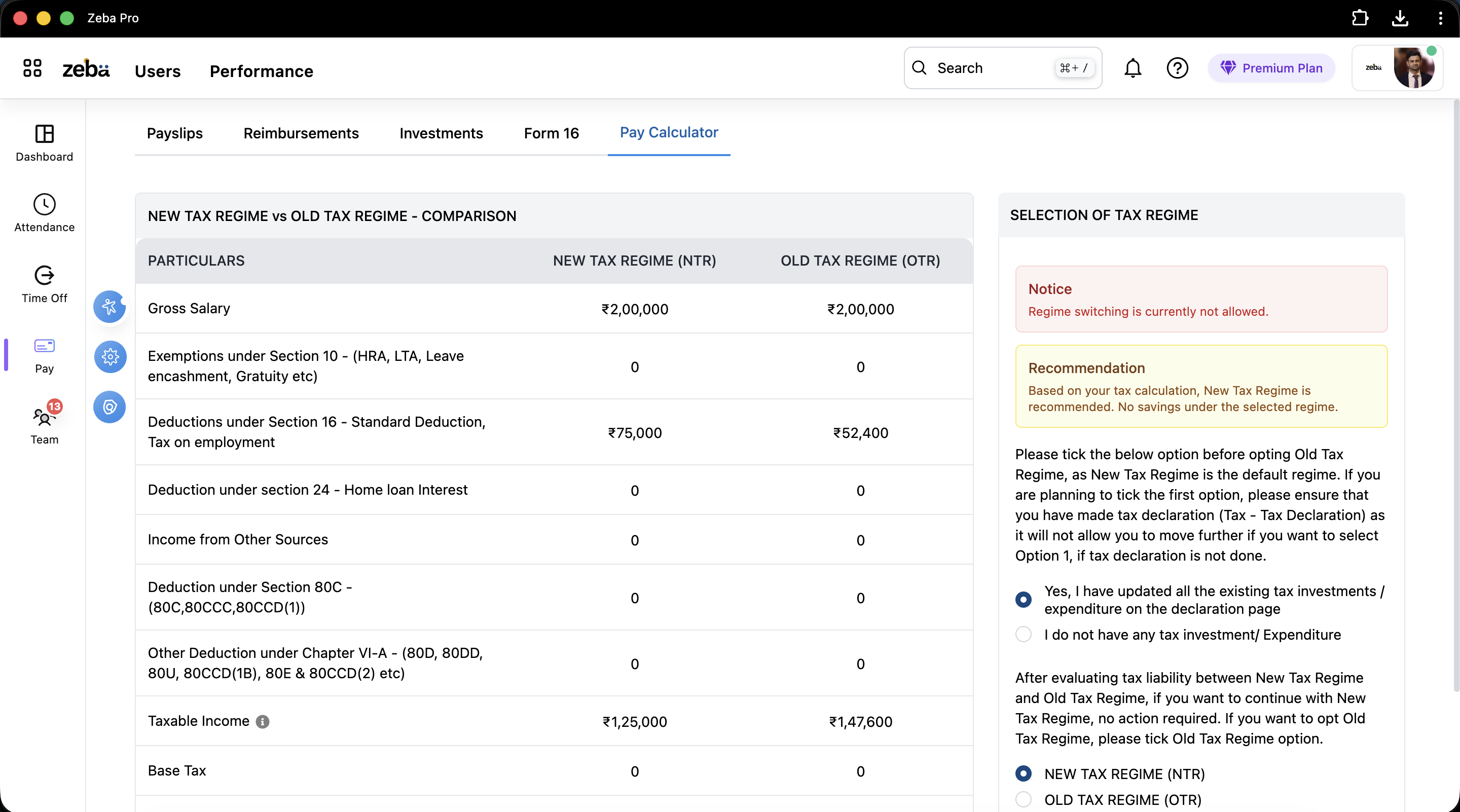
Knowing salary in hand is essential for employees assessing job offers and for employers wanting to provide clear information during hiring and payroll discussions. A salary in hand calculator makes this easier by converting gross salary or CTC into an estimated monthly take-home salary.
What Is a Salary In Hand Calculator?
A salary in hand calculator estimates an employee's take-home salary after accounting for various deductions and legal contributions. It helps employees see how much money they will actually receive each month rather than just relying on annual CTC figures.
For HR teams and employers, salary calculators can increase transparency and lessen confusion around pay structures.
Why Salary In Hand Is Different From CTC
Many employees believe their annual CTC matches the amount they will take home. In reality, several factors influence take-home salary.
- Provident Fund (PF): Deductions for employee contributions.
- Professional Tax (PT): Required in some states.
- ESI Contributions: For eligible employees.
- Income Tax: Based on the applicable tax structure and taxable income.
- Other Deductions: Insurance, advances, or company-specific deductions.
This is why salary in hand calculators have become popular among job seekers and employees weighing multiple job offers.
Key Components of Salary Calculation
1. Cost to Company (CTC)
CTC is the total amount a company spends on an employee in a year. It covers salary, benefits, bonuses, employer contributions, and other forms of compensation.
2. Gross Salary
Gross salary is the total salary earned before any deductions. It includes the basic salary, allowances, bonuses, and incentives.
3. Statutory Deductions
Required deductions like PF, ESI, Professional Tax, and income tax cut down gross salary to reach the final take-home amount.
4. Net Salary or Salary In Hand
Salary in hand is the amount transferred to the employee's bank account after all deductions have been made.
Why Businesses Use Salary In Hand Calculators
Salary calculators are beneficial for both employees and employers because they clarify pay structures.
- 1. Improves pay transparency.
- 2. Helps employees compare job offers.
- 3. Reduces questions about payroll.
- 4. Aids in compensation planning.
- 5. Supports HR teams during recruitment discussions.
Organizations that connect compensation planning with payroll automation can enhance salary accuracy and payroll efficiency.
Common Challenges in Salary Calculation
Manual salary calculations often lead to mistakes and inconsistencies.
- 1. Incorrect tax calculations.
- 2. Missed statutory deductions.
- 3. Delays in payroll processing.
- 4. Complex salary structures.
- 5. Changing compliance rules.
As businesses expand, these problems become harder to manage using spreadsheets alone.
Manual Salary Calculation vs Automated Payroll
| Area | Manual Calculation | Automated Payroll System |
|---|---|---|
| Salary Processing | Spreadsheet-based | Automated workflows |
| Accuracy | Prone to errors | Improved accuracy |
| Tax Calculations | Manual updates | Automatic calculations |
| Compliance | Higher risk | Better compliance management |
| Reporting | Time-consuming | Instant payroll reports |
How Attendance Impacts Salary In Hand
Attendance records directly affect salary calculations. Absences, overtime, shift allowances, and unpaid leave can all change an employee's final take-home salary.
Businesses that use attendance tracking systems can ensure payroll calculations are based on accurate attendance records.
Likewise, combining attendance with leave management helps organizations calculate salary adjustments more accurately.
How Modern HR Software Simplifies Salary Calculations
Modern HR platforms connect payroll, attendance, leave management, and employee records into one system. This cuts down on manual work and improves payroll accuracy.
Role-based access through user management keeps sensitive payroll information secure while allowing authorized users to access the data they need.
Companies with field employees can also combine workforce visibility through employee tracking with payroll and attendance management processes.
Best Practices for Accurate Salary Calculations
- 1. Keep accurate employee records.
- 2. Update payroll policies regularly.
- 3. Monitor attendance consistently.
- 4. Check statutory deductions before processing payroll.
- 5. Automate payroll workflows when possible.
- 6. Review salary structures periodically.
Following these practices helps businesses reduce payroll errors and build employee trust and transparency.
Conclusion
A salary in hand calculator gives employees a clearer picture of their actual take-home salary after deductions. While CTC is an important compensation metric, employees often focus on the amount deposited into their bank account each month.
Organizations that combine payroll automation, attendance tracking, leave management, employee tracking, and user management can create a more accurate and efficient payroll process while enhancing employee satisfaction and compliance.
Related reading
- 11 HR Metrics You Should Track for Effective Payroll Management
- Understanding Professional Tax in 2026: A Complete Guide for Employers
- Understanding Professional Tax in 2026: A Comprehensive Guide
- Achieve 2.5x Faster Payroll Processing with Statutory Compliance
- How We Achieved 41% Efficiency with Professional Tax Management
- 11 Hidden Payroll Costs of Leave and Holiday Management


