

Why Employees Still Use WhatsApp After Their Company Buys an HRMS
Your company has an HRMS. But an employee is going to be late, so they WhatsApp their manager. Someone wants leave, so they send an email first. A manager wants to know where a field employee is, so they call them. HR needs attendance information before payroll, so someone exports a file and sends it around.
At that point, I think there’s a reasonable question to ask: What exactly did the HRMS replace?
I’ve seen this problem repeatedly while speaking with businesses and building Zeba Pro. My conclusion isn’t that companies need to ban WhatsApp. It’s almost the opposite. People use WhatsApp because it’s easier than your HRMS.
If companies want better HRMS adoption, they need to understand why employees are bypassing the software instead of simply telling them to use it more.
Employees Don't Come to Work to Use an HRMS
I think this is where HR software companies sometimes get their priorities wrong. A salesperson comes to work to sell. An engineer comes to build. A factory worker has production work. A support engineer has customers to help. A manager has a team to run.
HR software is a supporting tool. For most employees, it should occupy a very small part of their working day. They might need to:
- Mark attendance.
- Apply for leave.
- Check a holiday.
- Download their payslip.
- Submit a request.
That’s probably it. So if performing those actions requires employees to remember where six different features live, we shouldn’t be surprised when they choose something they already understand. They open WhatsApp.
WhatsApp Has One Enormous Advantage Over Your HRMS
Nobody needs WhatsApp training. Imagine an employee wakes up late. They need to tell their manager: "I’ll be 30 minutes late today." They already know exactly what to do.
- Open WhatsApp.
- Open manager’s conversation.
- Type.
- Send.
Maybe 15 seconds. Now compare that with a badly designed HRMS:
- Open application.
- Log in.
- Find attendance.
- Look for a request.
- Wrong menu.
- Go back.
- Find another menu.
- Select a request type.
- Enter information.
- Submit.
That’s when companies sometimes respond: "Employees aren’t adopting the HRMS." I think that’s the wrong diagnosis. The employee has adopted the simpler workflow.
I Don’t Think HRMS Should Eliminate WhatsApp
This distinction is important. Suppose an employee applies for leave through Zeba Pro and then sends their manager a message: "I’ve applied for leave tomorrow. Please check whenever you get a chance."
I don’t see a problem with that. People communicate with each other. A manager might genuinely prefer being personally informed when someone won’t be available. Software doesn’t need to eliminate normal human interaction.
The problem is when WhatsApp becomes the system of record. For example:
Employee: "Can I take leave tomorrow?"
Manager: "Sure."
Done. Where is that leave now? Does HR know? Does attendance know? Has the employee’s leave balance changed? What happens when payroll runs? That’s where the problem begins.
Communication and HR Processes Are Two Different Things
I think companies should separate these concepts. WhatsApp can handle communication. Your HRMS should handle the official workflow. So:
- Employee → applies for leave in HRMS
- Manager → approves leave
- Attendance → understands approved leave
- Payroll → receives the correct attendance information
The employee can still message their manager. But the company isn’t dependent on that message to know what happened. That’s a much healthier relationship between communication tools and HR software.
"We’ll Train the Employees" Isn't Always the Answer
This is another thing I question. When employees don’t use software correctly, the immediate response is often: "We need another training session."
Sometimes that’s true. Some processes genuinely need explanation. But if you’re repeatedly training employees on how to perform basic actions, I’d investigate the product too. If 50 people independently ask, "Where do I apply for leave?", maybe you don’t have 50 employee problems. You might have one UI problem.
This is something we’ve learned directly while building Zeba Pro for different kinds of employees.
Manufacturing Workers Made This Particularly Obvious to Us
Manufacturing companies have employees with very different levels of comfort with technology. We’ve experienced situations where mobile app interactions that seem completely straightforward to a technical person create problems for workers. Permissions. App updates. Background behaviour. Location. Mobile data.
I’ve spent around 12 years working as a developer, so I have to be particularly careful about assuming: "This is obvious." Obvious to whom?
If a factory employee comes to the same location every morning, we often recommend biometric attendance instead of forcing them to use mobile attendance. Walk in. Punch. Work. That’s sometimes a much better user experience than designing the world’s prettiest "Check In" button.
HRMS Adoption Starts by Choosing the Right Interaction
This is something I think is overlooked. Companies sometimes treat HRMS adoption as: How do we make everyone use the app? I don’t think that should necessarily be the objective. The objective should be: How do we get accurate HR processes with the least friction for employees?
- For a factory worker: Biometric attendance.
- For an office employee: Mobile or web attendance.
- For a field salesperson: Mobile check-in.
- For a manager: Team view on web or mobile.
Different employees don’t have to interact with the HRMS in exactly the same way for the company to have one integrated HR system.
One of the Biggest Adoption Problems is Simply Too Much Navigation
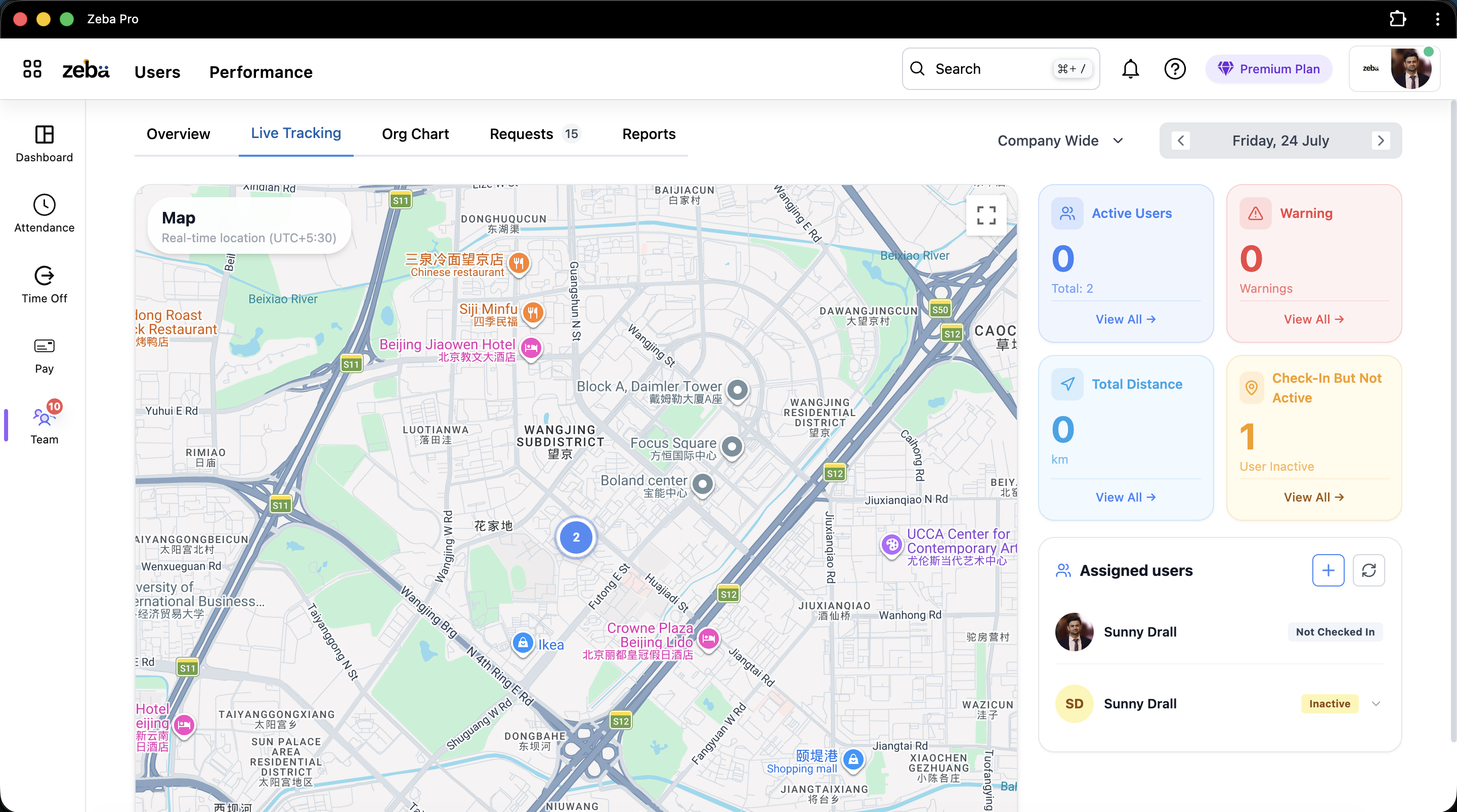
This heavily influenced how we’ve designed Zeba Pro. When a user lands in our primary HRMS experience, we don’t want them immediately seeing 15–20 different sections. The core navigation is intentionally limited around:
- Dashboard
- Attendance
- Time Off
- Pay
- Team
That’s it. We have other functionality. Hiring exists. Invoices exist. There are many deeper HR features. But why should someone checking today’s attendance have all of those things competing for their attention? They shouldn’t.
We Borrowed an Idea from Google
Google has Gmail, Drive, Calendar, Docs, Sheets, Meet, and many other products. Yet when you’re reading an email, Gmail doesn’t constantly remind you that Google Sheets exists. You can switch applications when you need one.
That influenced how we’ve structured Zeba Pro. Instead of making one enormous navigation containing every product capability, users can switch between applications when they need them. If they move to another application, the navigation changes around that work.
From an engineering perspective, these products can still be closely connected. But from the user’s perspective: Show me what I need right now. I think that principle matters enormously for HRMS adoption.
More Features Can Reduce Adoption
This sounds strange when you’re building SaaS because feature count is often treated as a competitive advantage.
- Vendor A: 120 features.
- Vendor B: 175 features.
Therefore Vendor B must be better, right? But imagine your employee uses six of them. The remaining 169 can potentially become navigation, configuration, and cognitive load. This is why I don’t think HRMS adoption should be measured by how much functionality you expose. It should be measured by how easily people complete the workflows that matter to them.
Managers Are Particularly Important Here
Managers aren’t HR professionals. This sounds obvious, but HRMS products don’t always behave as though it is. A sales manager might need to approve leave, check attendance, understand where field employees are, review team requests, and look at an employee’s information.
They probably don’t need to understand how every attendance or payroll policy is configured. That’s why we’ve tried to make "Team" a central concept in Zeba Pro. The manager thinks: "I need to understand my team." The software should organize itself around that objective. Not around our database structure.
"Where Are You?" is Another Workflow Software Should Reduce
Field teams provide another good example. Without employee location visibility, managers may call: "Where are you right now?" The employee answers. An hour later, the information is outdated. Another call. Or perhaps they share their location over WhatsApp.
Again, WhatsApp works. But it doesn’t understand the employee’s attendance, route, kilometres travelled, or working session. When companies genuinely need this visibility, we think it makes more sense for the field workflow to be connected to the employee’s HR and attendance information. The manager shouldn’t need to reconstruct someone’s workday from a WhatsApp conversation.
Don’t Make Employees Enter Information the System Already Knows
This is one of the fastest ways to make people dislike business software. Imagine Zeba Pro already knows the employee checked in, travelled during field work, checked out, their attendance exists, and their leave requests exist. Now HR asks the employee to enter some of that same information somewhere else. Why?
Every duplicate entry creates another reason for someone to think: "I’ll just send this on WhatsApp." The more information systems can carry forward automatically, the less employees need to interact with them. And paradoxically, I think that’s one of the best ways to improve software adoption. Make people use the software less.
Good Integration Reduces the Amount of HRMS Employees Need to Understand
Consider leave. An employee shouldn’t need to know: "My approved leave will later affect attendance, which will then be consumed by payroll." They should just know: Apply for leave here. That’s it. The HRMS should understand the relationship.
Likewise, a factory employee shouldn’t need to know how biometric punches get interpreted. Punch. Work. A field employee shouldn’t need to understand how GPS points are stored. Check in. Work.
The more relationships the software understands, the fewer processes the employee has to understand.
Support is Part of HRMS Adoption Too
There’s another reason companies fall back to WhatsApp, Excel, and manual processes. They get stuck.
We’ve spoken with businesses that were frustrated with their existing HRMS because support could take days to respond. Sometimes the feature they wanted actually existed, they simply couldn’t find it. Now imagine the employee or HR person has a job that needs completing today. They’re not going to wait two days because the official system is confusing. They’ll find a workaround. Usually: Excel. Email. WhatsApp.
Then the workaround becomes part of the process. So I don’t view customer support as something separate from the HRMS product. Support affects adoption.
We Saw the Same Problem With Mobile-App Updates
Manufacturing companies taught us another useful lesson. Suppose a customer requests a feature. We release an app update containing it. Now HR needs employees to install the latest version. Some update. Some don’t. HR sends reminders. Managers follow up. Suddenly our software release has created an administrative task for the customer.
So we introduced the ability to force an application update where necessary. It’s a small feature. But the philosophy behind it is important: Don’t make HR coordinate something the software can coordinate itself. Every unnecessary human step is another place where adoption can break.
What I’d Measure Instead of "Number of HRMS Logins"
If employees don’t spend much time inside your HRMS, that isn’t necessarily a bad sign. I wouldn’t want an employee spending 45 minutes navigating Zeba Pro to apply for leave. I’d rather they spend 30 seconds. So instead of only asking, "How frequently are employees opening the HRMS?", I’d ask:
- Can employees complete basic actions without assistance?
- How long does applying for leave take?
- How many attendance-related support tickets are raised?
- How often does HR need Excel after implementing the HRMS?
- How frequently are official requests still happening only through WhatsApp?
- How often does HR manually send information to payroll?
Those tell you much more about true adoption.
A Simple Test for HRMS Adoption
If you’ve already implemented HR software, look at your company’s WhatsApp messages, emails, and spreadsheets—not the private content, but the processes your teams say they still rely on.
- Ask HR: "What information do employees still send you outside the HRMS?"
- Ask Managers: "What HR-related things do employees still message you about?"
- Ask Payroll: "What information does HR still manually send you every month?"
You’ll probably discover your real HRMS adoption gaps very quickly. Don’t immediately ban those workarounds. Ask: Why is the workaround easier than the official process? That’s the useful question.
What We’re Trying to Achieve With Zeba Pro
My objective isn’t to create an HRMS that employees spend more time using. It’s almost the opposite. I want someone to open Zeba Pro, do what they came for, and get back to their actual work.
- Employee needs attendance? Attendance.
- Needs leave? Time Off.
- Manager needs their people? Team.
- Needs another application? Switch to it.
The complicated relationships between attendance, leave, shifts, location, policies, and payroll should increasingly be handled by the system. Because employees don’t need another piece of software to learn. They need their HR processes to work.
And I don’t think WhatsApp disappearing from companies is the measure of whether we’ve succeeded. People will keep messaging each other. That’s normal. The better measure is:
If that WhatsApp message disappeared tomorrow, would the company’s official HR process still know what happened?
If an employee’s leave exists only in a chat, probably not. If the leave was applied and approved through the HRMS, attendance understands it, and payroll eventually receives the correct information, then yes.
Use WhatsApp to communicate. Use your HRMS to run the process. And if employees consistently prefer WhatsApp for the process itself, don’t immediately blame the employees. First, ask what your HRMS is making unnecessarily difficult. That’s one of the principles we’re trying to follow while building Zeba Pro.


