


How Do You Track Field Employees, Kilometers Travelled and Reimbursements?
If your field employees travel for customer visits, sales, or support work, you need more than their morning attendance. You need to know:
- Did they actually go into the field?
- Which areas did they cover?
- How many kilometers did they travel?
- How long did they spend at customer locations?
- How much travel reimbursement should they claim?
What surprised me while speaking with companies building their field operations wasn't that they were using bad tracking software. Many weren't using field employee tracking software at all.
Managers called employees. Employees sent updates on WhatsApp. Companies relied on what employees told them. And for travel expenses, employees sometimes submitted petrol pump receipts and the company reimbursed them without having much clarity about how much business travel had actually happened.
That isn't necessarily because these companies don't care about accuracy. Often, the alternative means introducing another application costing roughly ₹180 to ₹300 per employee every month.
If you already pay for HRMS software, attendance tracking, and payroll, adding another subscription just to understand where your employees worked starts becoming difficult to justify. This is one of the reasons we built field employee location and kilometer tracking directly into Zeba Pro.
But the more interesting problem isn't GPS. It's what companies can do with the information.
A Petrol Receipt Doesn't Tell You How Far an Employee Travelled
Imagine one of your salespeople submits a petrol receipt for ₹2,500. You know they bought fuel. What you don't necessarily know is:
- How many kilometers did they travel for work?
- Which customers did they visit?
- What route did they take?
- Was all the fuel related to business travel?
The employee may be completely genuine. The problem is that neither side has particularly good information. The company has to trust an expense without much context, and the employee doesn't have an accurate record to prove how much they actually travelled.
This is why I think kilometer tracking for field employees can be useful to both sides. Instead of trying to reconstruct someone's working day at the end of it, the system can record it while it happens.
How Zeba Pro Tracks Kilometers Travelled by a Field Employee
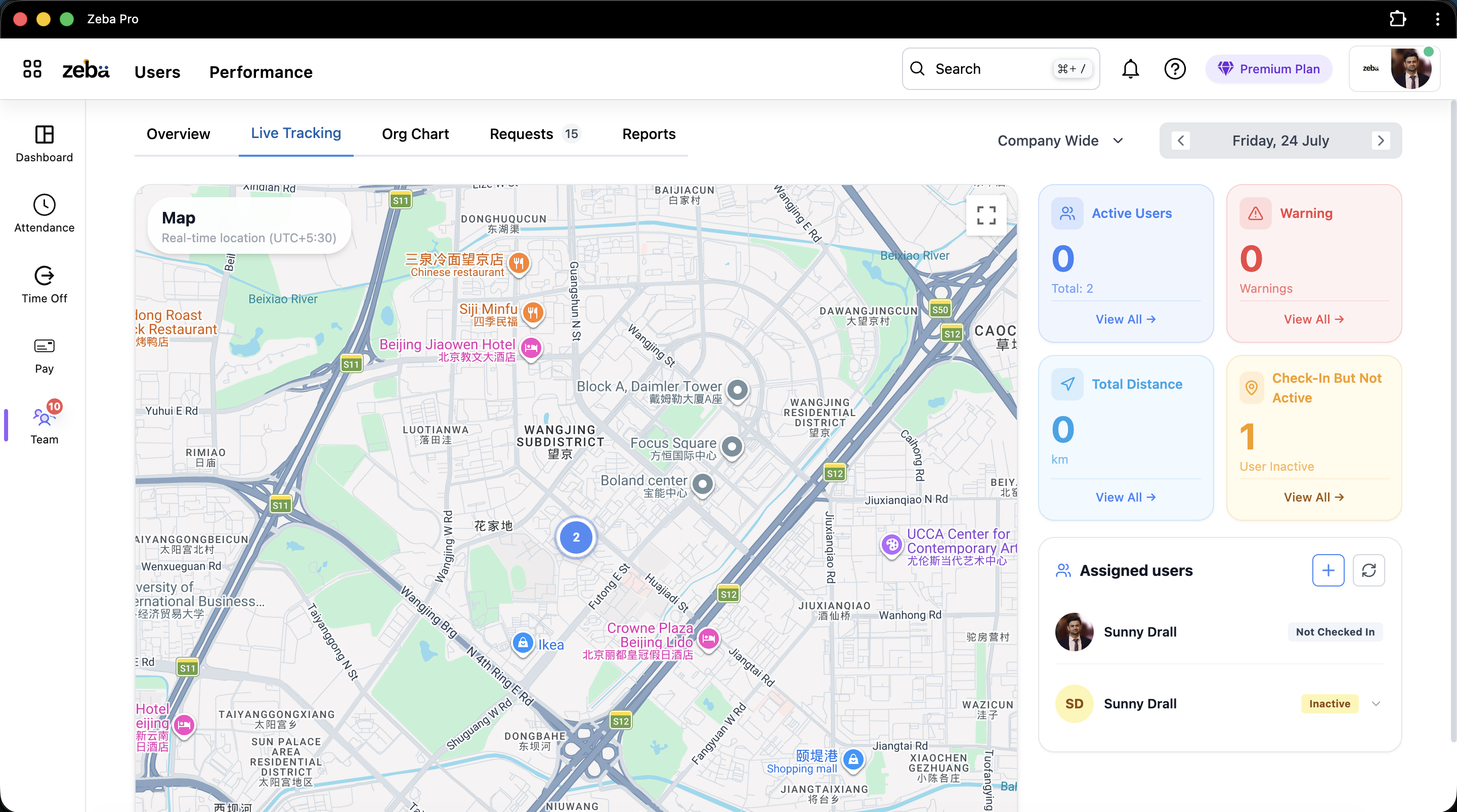
When live employee tracking is enabled for an eligible field employee in Zeba Pro, location tracking begins as part of their active check-in session after the required permissions are granted.
During that session, the mobile application can provide location updates based on approximately every 30 seconds or a movement of around 50 meters. Those location points allow us to reconstruct the employee's movement and calculate the distance travelled during their working session.
So instead of the employee saying: "I think I travelled around 70 km today," they can see the exact distance recorded for their workday. Their manager can see it too. That creates a common reference point for travel and reimbursement.
The Route Matters as Much as the Kilometers
Suppose two employees both travelled 60 km. That tells the manager something, but not enough. A sales manager leading sales teams may also want to understand which areas have actually been covered.
That's why managers can see the employee's route rather than only their total distance. For example:
- Employee A covered customers in one area.
- Employee B covered another area.
- Employee C hasn't yet reached an area the manager expected to be covered.
The manager now has operational information they can use to decide where to send the next salesperson. Location tracking starts becoming a field planning tool, not simply an employee-monitoring tool.
Field Tracking Isn't Only for Sales Teams
Sales is an obvious use case. But one of our manufacturing customers gave us a good example of why technical and engineering operations need field employee tracking too.
They operate in battery manufacturing. Their support engineers sometimes need to travel to a customer's location when there's a problem with a battery. Think about the manager's problem: A customer reports an issue. One engineer is already working somewhere nearby, while another engineer is considerably farther away.
If the manager understands where their field support team is working in real time, they have better information for deciding who should handle the next customer. The employee's work isn't happening inside the factory, so their HR and attendance system needs to understand that dynamic environment.
"Where Are You?" Shouldn't Be a Management System
Before using tracking software, many businesses simply rely on manual communication. The manager calls: "Where are you?" The employee answers, or sends a WhatsApp update. That works for one person. But now imagine managing 20 people.
The manager needs to understand where five people are: that's five calls. Then something changes an hour later, leading to more calls. And after all those conversations, there still isn't a reliable record of the day's movement.
This is why I don't think the goal of field staff tracking software should be to give managers another dashboard they need to constantly watch. It should reduce the number of questions managers have to ask.
WhatsApp Live Location Isn't Really a Field Workforce System
WhatsApp location sharing is useful, but it's solving a different problem. An employee can share their live location with their manager, but does that location data understand:
- Their attendance and working hours?
- Their shift configuration?
- Their total travel distance?
- Their leave management records?
- Their eventual payroll automation payout?
No. The manager has location information inside one conversation, while the HR information exists somewhere else. That fragmentation is the bigger problem we're trying to solve.
What Happens When the Employee Has No Mobile Data?
This is an important practical issue with GPS tracking for field employees. Field work doesn't happen in perfect network conditions. An employee can enter an area with poor connectivity, or mobile data can temporarily stop working.
If location tracking requires every point to reach the server immediately, you end up with gaps. We've accounted for that in Zeba Pro. The application can continue collecting relevant location information offline and send the stored route to the backend once communication is restored. Temporary network loss doesn't mean the loss of the employee's entire day route.
But What If the Employee Deliberately Closes the App?
That's a different situation. For continuous location tracking to work properly, the Zeba Pro application needs to remain available in the background: similar to applications such as Google Maps or WhatsApp when they're actively using location.
If an employee closes the app, Zeba Pro detects tracking inactivity instead of silently showing the last known location. The employee can receive notifications or emails about the inactivity. If they're still checked in and inactivity continues for around 30 minutes, organizations can configure the system so that the manager is informed.
The software shouldn't immediately assume the employee is doing something wrong: it should simply flag that expected tracking information isn't being received.
Can Companies Use Live Location for Non-Field Employees?
Interestingly, we've received this request too. One concern companies have described is an employee coming to the office, checking in, leaving while their manager isn't present, and then returning later to check out.
Their attendance record might look completely normal (Check-in: 9:10 AM, Checkout: 6:05 PM), but the employee wasn't actually at work for much of that period. Some companies ask for continuous location visibility for non-field staff to solve this.
Technically, location tracking can address this, but I don't think the answer should automatically be to track everyone all the time. Companies need to balance their legitimate attendance requirements against employee privacy.
My View: Tracking Should Have a Clear Work-Related Purpose
The ability to track an employee doesn't mean a company should have unlimited access to that person's location. If you're tracking a field salesperson or support engineer visiting customer sites, or calculating distance for reimbursements managed by your finance team, the purpose is clear.
However, location tracking shouldn't quietly become 24-hour surveillance. That's why our continuous tracking is strictly connected to the employee's active working session. When the employee checks out, tracking stops completely.
What Happens If an Employee Forgets to Check Out?
Imagine someone checks in at 9 AM, works all day, finishes, goes home, and forgets to check out. A poorly designed system could continue tracking them into the evening.
Zeba Pro limits a continuous tracking session to a maximum of 9 hours from check-in. Even if the employee forgets to check out, location tracking automatically halts. Privacy shouldn't depend entirely on an employee remembering to press a button.
Don't Use Live Location Tracking If You Don't Actually Need It
We sell this functionality, but I still wouldn't recommend turning it on simply because it's available. Ask yourself: What business problem are we trying to solve?
If your employee sits at the same desk all day and biometric attendance already tells you what you need to know, continuous GPS adds little value. But if an employee spends the entire day travelling between customers, their location helps answer vital operational questions about field work, territory coverage, distance travelled, and travel reimbursement.
Employee Tracking Becomes Much More Useful When It's Connected to HRMS
This is the reason we've chosen to build these capabilities inside Zeba Pro rather than make location tracking another standalone product. Without integration, a manager managing HR teams and operations needs five separate systems: HRMS, attendance, GPS tracking, expense reimbursement, and payroll.
In Zeba Pro, these pieces are unified. A manager can view an employee's profile to see attendance, shifts, time logs, working hours, overtime, live location, and documents in one unified view. The real advantage isn't just having a map: it's that the map understands which employee you're looking at.
Why Pay ₹180 to ₹300 Per Employee for Another Tool If You Don't Need One?
Dedicated tracking tools can cost roughly ₹180 to ₹300 per employee per month. For 100 field employees, that is ₹18,000 to ₹30,000 every month (or ₹2.16 lakh to ₹3.6 lakh per year) for a separate system, on top of your standard HR software costs.
By offering live location as an integrated feature within Zeba Pro's transparent pricing structure, companies avoid both high subscription overhead and software fragmentation.
How I Would Evaluate Field Employee Travel Tracking
If I were evaluating field employee tracking software today, I wouldn't simply ask: "Do you provide live GPS?" I would ask the vendor to demonstrate a complete working day using this checklist:
| Scenario / Event | Question to Ask the Software Vendor |
|---|---|
| Connectivity Loss | What happens to location data when an employee loses internet connection? |
| Distance Calculation | Can both the employee and manager see the total distance travelled for the day? |
| Customer Visits | Can I understand how long an employee spent at a customer site from their route history? |
| App Inactivity | Will the system alert management if the app stops sending tracking information? |
| Shift End & Privacy | When exactly does tracking stop, and what happens if an employee forgets to check out? |
| Reimbursement Support | What verifiable route and kilometer data supports travel expense claims? |
| HRMS Integration | Does location tracking seamlessly feed into attendance, leaves, and payroll automation? |
What Customers Changed About How I Think About Field Tracking
When we first discussed live location internally, it would have been easy to treat it as a checkbox feature. But customer conversations changed how I look at it. Location itself isn't particularly valuable: context is.
Where did the employee go? Why were they there? How far did they travel? How long were they there? How does it relate to their working day? Can the employee use that information too? And can the manager get those answers without calling the employee every hour?
That's what we're trying to solve with Zeba Pro: not simply GPS tracking, but a clearer, fairer picture of what field work actually looks like every day.


