


Employee Location Tracking vs Employee Surveillance: Where Should Companies Draw the Line?
I run a company that has built live location tracking into our HRMS. And I still don't believe companies should track employees simply because the technology allows them to.
There are legitimate reasons an employer might need location information:
- A salesperson spends the day visiting customers.
- A support engineer travels to customer sites.
- A company reimburses employees based on kilometers traveled.
- A manager needs to understand which areas their field team has already covered.
- Or a business has employees checking into work remotely and needs reasonable assurance that attendance reflects actual work.
These are real problems customers have brought to us while we've been building Zeba Pro for startups and operational teams. But there's another question that is just as important: When does employee location tracking stop being a work-management tool and start becoming surveillance?
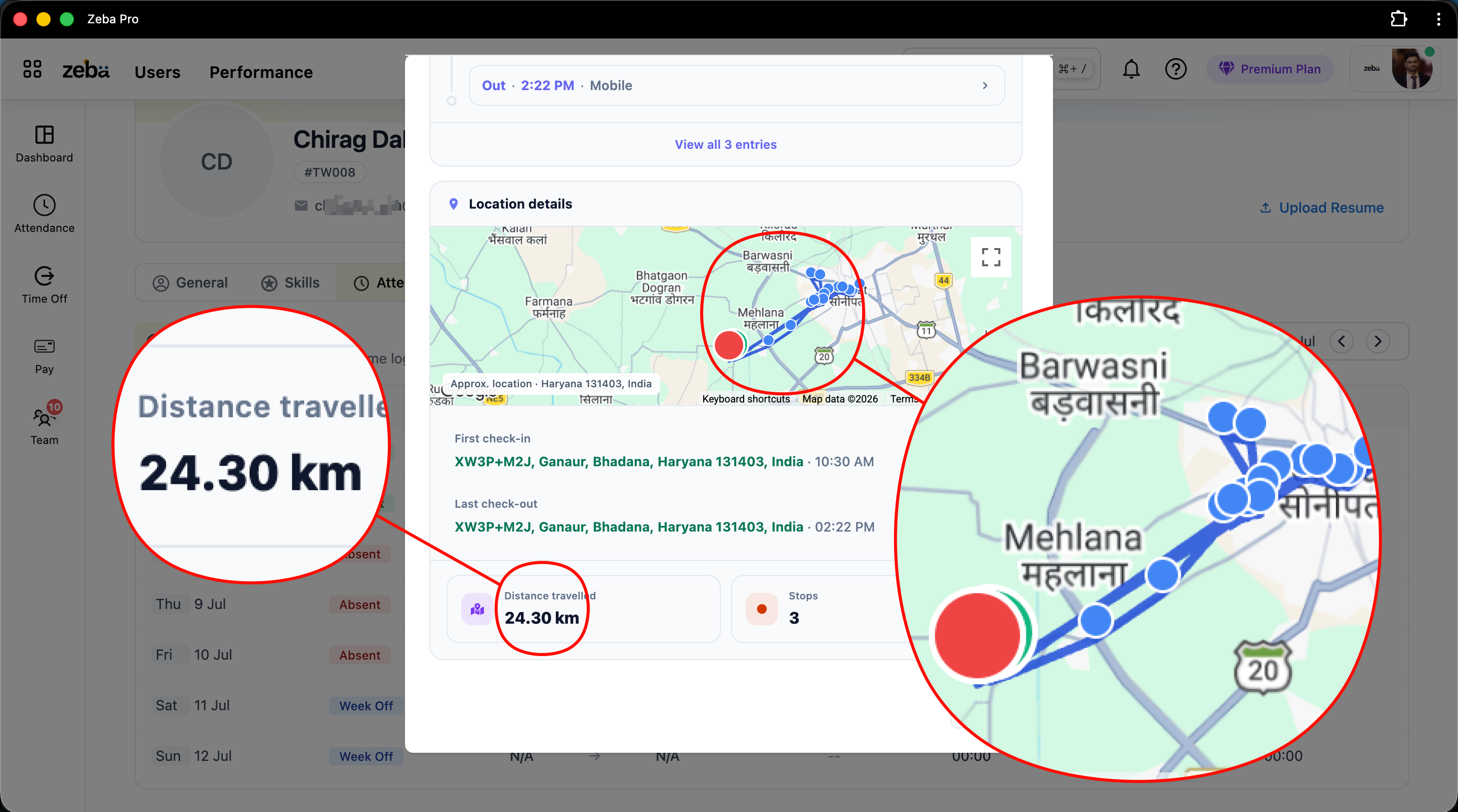
We had to think about this ourselves while designing the feature. My view is fairly straightforward: If an employee's location is no longer relevant to their work, the company shouldn't continue receiving it.
Why Companies Started Asking Us for Employee Location Tracking
Live employee tracking wasn't something we originally expected to become such an important part of our platform. Then customers kept asking for it.
One of the clearest conversations happened during a demo. A company told us:
"We mostly have field employees, and we don't get a clear understanding of where our field employees are, how many kilometers they have traveled today for reimbursements, and whether they are actually telling the truth about the field work."
Simply marking someone "Present" in standard attendance software doesn't solve any of those problems. The employee could be present and working 50 kilometers away from the office. The manager needs a different kind of visibility.
Field Employees Aren't the Only Reason Companies Ask for Location Tracking
This surprised me. We expected the strongest demand to come from sales and field teams. But we've also heard concerns about employees who work from a fixed location.
For example, a company might have an employee who: Comes to the office → Checks in → Leaves → Returns in the evening → Checks out.
If the manager wasn't physically present that day, the attendance record could look completely normal (Check-in: 9:05 AM, Checkout: 6:12 PM). Nine hours of apparent attendance doesn't necessarily mean nine hours at work. So I understand why employers ask: "Can we see where the employee was during their working hours?"
There is a legitimate business concern there. But that still doesn't mean the answer should be: Track everybody continuously.
Before Enabling GPS Tracking, Ask What Problem You're Solving
This is probably the most important question I'd ask. Not: "Can our HRMS track employees?" but rather: "Why do we need to track this employee?"
Take a field salesperson. Their job requires traveling between customers. Location information can help understand:
- Where they are working
- Which areas they covered
- How much they traveled for reimbursement
- How long they remained around customer locations
- Whether the planned territory was covered
There's an obvious connection between location and their work. Now consider someone sitting at the same desk inside your office every day. If biometric attendance already gives the company the information it needs, continuous GPS provides very little additional business value. Just because information is available doesn't mean you need to collect it.
Location Tracking Should Answer a Business Question
This is the distinction I've started making while thinking about this feature. These are legitimate business questions:
- "Which areas did my sales team cover today?"
- "How many kilometers did this support engineer travel for customer visits?"
- "Which field engineer is closest to this customer who needs support?"
But eventually, you can cross into: "Where is this employee every minute, regardless of whether they're working?" That's no longer the same problem. The purpose has changed from management to surveillance.
One of Our Customers Gave Us a Good Example
We work with a battery manufacturing company. Their support engineers sometimes need to travel to a customer's location when there's an issue with a battery.
Imagine a customer calls, and a battery needs inspection. Knowing approximately where those engineers are in the field helps the manager assign who is best positioned to handle the customer. The employee's location has an operational purpose.
But once that engineer finishes their working session, does the company still need to know where they go? I don't think so.
That's Why Tracking in Zeba Pro is Tied to the Working Session
This was an important design decision for us. For employees configured for continuous field tracking via custom user management settings, location tracking is strictly connected to their active check-in session.
The employee checks in → required location permissions activate → tracking begins for the session → the employee checks out → tracking stops.
The company needs visibility into work. It doesn't automatically need visibility into the employee's life after work.
But What Happens When Someone Forgets to Check Out?
Imagine an employee checks in at 9 AM, works normally, and finishes at 6 PM. But they forget to press Checkout. They travel home, go shopping, or meet friends. At 10 PM they suddenly remember: "I forgot to check out."
If your tracking system simply says "Checked in = keep tracking," then the company has received several hours of personal location data it didn't actually need.
Technically, the employee forgot to check out. But I don't think that means the company should automatically get unlimited location access. So we added another boundary.
Zeba Pro Stops Continuous Tracking After a Maximum of 9 Hours
Continuous tracking in Zeba Pro is limited to a maximum of 9 hours from check-in. After that, location tracking stops automatically.
This isn't a technical limitation: it's a product philosophy decision. We could design a system that continues tracking for much longer, but an attendance mistake shouldn't automatically turn into after-hours location tracking.
Employees can also end tracking themselves at any point by checking out between sessions (e.g., during field breaks). That creates a clear, genuine boundary.
What Information Should Managers Actually See?
Once you're collecting information from someone's phone, it's tempting to expose everything technically available. I don't think that's a good product principle.
For example, phone battery information can be useful. If an employee's phone has very little battery remaining, the manager and internal IT teams have useful context about why tracking might soon become unavailable. But the philosophy shouldn't be: The phone gives us this information, therefore let's show it. It should be: Does the employer genuinely need this to manage the work process?
Our legal team and product designers constantly evaluate features against this data-minimization principle.
Tracking Inactivity Doesn't Automatically Mean Employee Misconduct
For continuous tracking to work, the mobile app needs to remain available in the background. But real life happens: an employee closes the app, the operating system stops background activity, or connectivity disappears.
If the app stops updating location for around 30 minutes, the manager receives a notification. But there is an important distinction: "We aren't receiving location updates" does not automatically mean "The employee is doing something wrong." Software should present facts; managers should provide context.
Furthermore, when mobile connectivity drops, Zeba Pro retains tracking coordinates locally on the device and syncs them once back online. That way, legitimate travel logs aren't lost simply due to spotty cell service.
Kilometer Tracking is One of the Strongest Arguments for Field Location
One of the clearest benefits we've seen is travel reimbursement. Before using an automated tracking system, some mid-market businesses rely on employees submitting petrol pump receipts.
A petrol receipt tells you fuel was purchased, but it doesn't tell you how many business kilometers were traveled. With field location tracking, both the employee and the finance team have an accurate, shared record of distance traveled during the working session.
The company gets clarity, and the employee gets verified claims that streamline payouts through payroll automation. Accurate travel calculations also feed directly into compliant tax treatment, making life easier when assessing non-taxable allowances alongside tools like an income tax calculator.
Location Tracking Shouldn't Be Designed Only for Catching Employees
If your entire product message is: "Catch employees lying," you establish an adversarial relationship immediately. Location tracking should be designed to reduce friction, eliminate manual status calls, optimize travel routes, and simplify reimbursements.
Managers shouldn't need to sit and watch employees move around a map all day. The goal is to reduce operational uncertainty, not create a digital control room for watching human beings.
What I'd Ask Before Enabling Live Location Tracking for Employees
Before switching location tracking on, HR teams should be able to answer these questions:
- What specific business problem are we solving?
- Which employees actually require location tracking?
- Could biometric attendance or geofencing solve the problem with less data?
- What information does the manager genuinely need?
- When exactly will tracking begin and stop?
- What happens if an employee forgets to check out or loses connectivity?
- What benefit does the employee receive from the tracking information?
If you can't clearly answer the first question, I wouldn't enable the feature yet.
Track the Work, Not the Person
When customers first asked us for live location tracking, it could easily have been just another checkbox on our roadmap. But building it responsibly required answering ethical and design questions, balancing functionality against clear pricing value.
My view while building Zeba Pro remains simple: Track the work, not the person.
If location information helps understand an employee's work during an active session, there is a legitimate reason to use it. When that working purpose ends, the tracking should end with it. That's the line we maintain across our entire suite, whether tied to location logs or broader leave management policies.


