


Attendance Software for Manufacturing Companies: Biometric, Geofencing or GPS: What Should You Use?
If you manage attendance for a manufacturing company, I don't think the answer is to pick just one method, whether that is biometric attendance, geofencing or GPS attendance, for everyone.
You may actually need all three.
The right attendance method depends on where that employee works.
For example:
- Factory worker: Biometric attendance
- Office employee: Biometric or geofenced attendance
- Employee working at a fixed external site: Geofenced attendance
- Field salesperson or technician: Mobile check-in + location tracking
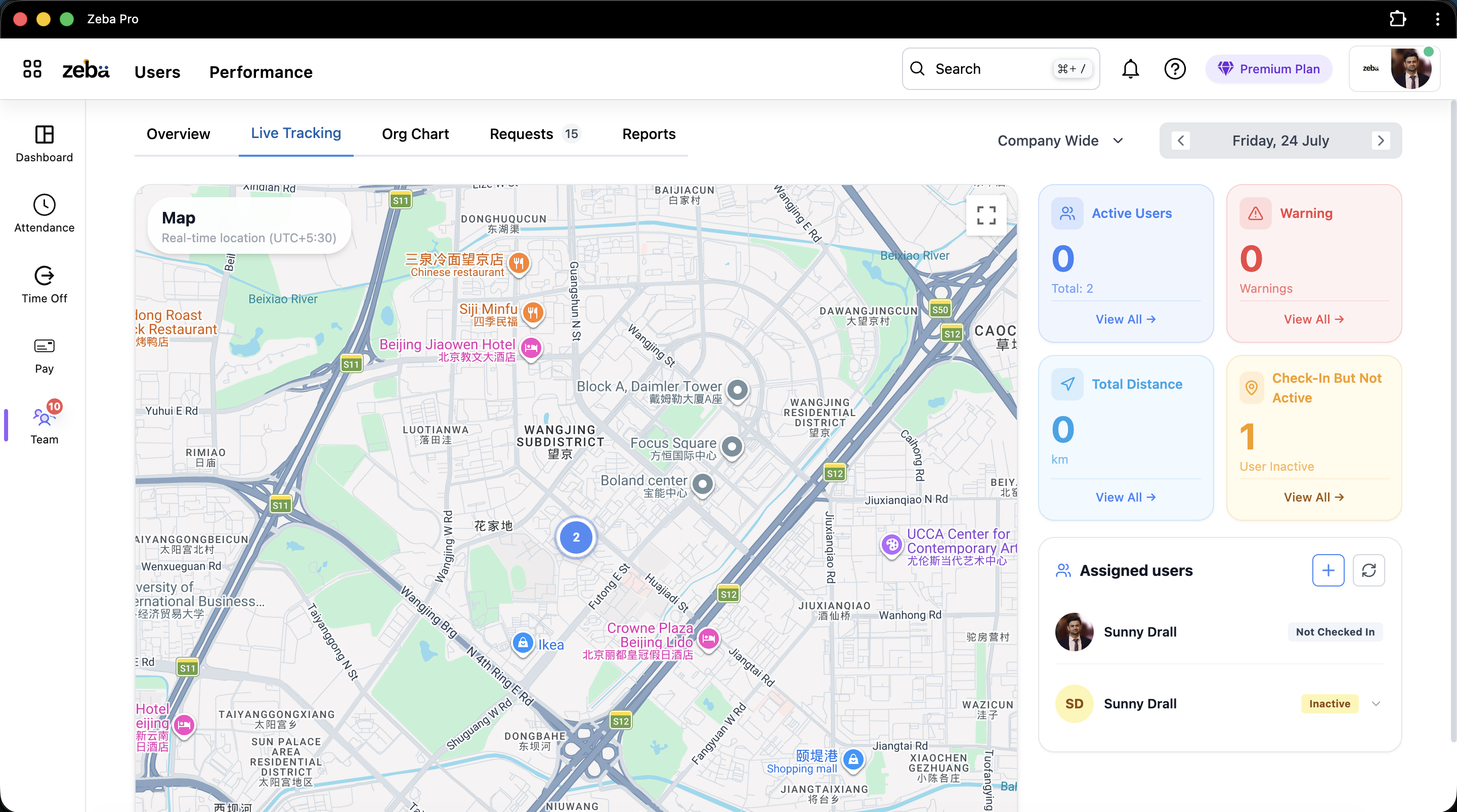
One thing I've learned while building Zeba Pro is that attendance becomes harder than it needs to be when HR software expects every employee to follow the same process.
A manufacturing company doesn't have one type of employee. So why should it have only one way to record attendance?
Biometric Attendance Works Extremely Well When the Workplace Is Fixed
Let's start with the simplest case. If 200 employees enter the same manufacturing facility every morning, biometric attendance tracking makes sense.
The employee arrives, authenticates, and the punch gets recorded. There is very little doubt about where the employee was when attendance was marked.
But there's something I think businesses should pay much more attention to: what happens after the biometric punch?
Because capturing attendance isn't the same as managing attendance.
Suppose an employee's biometric record says check-in is at 8:17 AM. The HRMS still needs context:
- What shift was the employee assigned?
- When was that shift supposed to start?
- Were they late?
- Was today a working day for them?
- Were they supposed to be on leave?
- How many hours did they eventually work?
- Was there overtime?
- Will any of this affect payroll?
If your biometric system gives HR an Excel file and HR still has to figure out everything else manually, you've automated only the first few seconds of the attendance process.
Your Biometric Machine Shouldn't Become an Excel Generator
This is where I'd look carefully when choosing biometric attendance software for a manufacturing company.
A biometric machine can accurately capture punches. That's useful. But if your monthly process looks like this:
Biometric machine → Export attendance → Excel → HR verifies attendance → Check leave separately → Calculate LOP → Send information to payroll/CA → Payroll asks questions → HR sends corrections
Then you still have a very manual attendance process. The device isn't the problem. The disconnected workflow is.
What we're trying to achieve with Zeba Pro is closer to a unified flow: Biometric → Attendance → Leave/Policies → Payroll.
The employee shouldn't appear as five different versions of the same person across five systems. Integrating automated leave management directly with attendance removes this unnecessary administrative friction.
But Biometric Attendance Doesn't Work for Everyone
Now imagine the same manufacturing company has 20 salespeople. They don't come to the plant every morning. They leave home and visit distributors, dealers, or customers.
What should they do? Travel to the factory just to mark attendance and then leave for their actual work? Obviously not.
You could give them a mobile attendance app. But then another question appears: where should they be allowed to check in?
And that's where geofencing and field attendance become useful.
When Should a Manufacturing Company Use Geofenced Attendance?
I think geofencing works best when you know where someone is supposed to work, but biometric attendance isn't practical.
Suppose your company has multiple locations:
- Plant A
- Plant B
- Warehouse
- Head office
- Regional office
Employees assigned to those locations shouldn't necessarily be able to mark attendance from anywhere. Instead, you can create an allowed geographic area around the workplace.
The employee checks in through their phone. The system checks whether they're within the designated location. If they are, attendance can be allowed according to the company's configuration.
This answers a very specific question: "Was the employee at the expected workplace when they checked in?" For fixed workplaces, that may be enough.
Geofencing and Live Location Tracking Are Not the Same Thing
This distinction is particularly important. I sometimes see these concepts discussed as if they're interchangeable. They're not.
Geofencing answers: Where was the employee when they checked in?
Continuous location tracking answers: Where did the employee go after they checked in?
Imagine a salesperson. They check in at 9 AM. Knowing where they were at 9 AM doesn't tell you what happened between 9 AM and 6 PM. That's why field employees can require a completely different approach using specialized employee tracking software.
What Attendance Should Look Like for Field Employees
This is something our customers pushed us to think about more seriously. During one Zeba Pro demo, a customer told us:
"We mostly have field employees, and we don't get a clear understanding of where they are, how many kilometres they have travelled for reimbursements, and whether the field-work updates are accurate."
That's not really an attendance problem. It's a field-work visibility problem. The employee being marked 'Present' doesn't answer it.
So for employees assigned to Field Work in Zeba Pro, companies can allow field check-in and optionally enable continuous location tracking. Now the employee's working day has more context.
What Happens After a Field Employee Checks In?
Suppose a salesperson starts working at 9 AM. They check in through the Zeba Pro mobile app. For continuous location tracking, the required phone permissions must be enabled. Tracking then begins.
During the active working session, the mobile application can send location information based on approximately every 30 seconds or a 50-metre change in location.
Now the manager can understand key operational details:
- Current location
- Route travelled
- Total kilometres travelled
- Time spent around particular locations
And we also capture useful device information such as the employee's phone battery. That gives managers a little more context about the tracking session.
Why Distance Travelled Belongs With Attendance
At first, kilometres travelled may sound unrelated to an employee attendance system. For field teams, it isn't.
Imagine a salesperson reports: "I travelled 78 km today." That number might eventually become part of a reimbursement claim processed by finance teams.
How does the employee accurately remember the distance? How does the company verify it?
With field tracking, the employee gets a record of their movement during the working session. The employee can see the distance travelled, and the company can see it too. That gives both sides a common record.
I like this approach because the location data isn't useful only to the employer. The employee gets something from it as well.
What If the Employee Stops Sharing Their Location?
This is another thing I'd ask any vendor offering GPS attendance for field employees.
A GPS marker on a dashboard can look impressive. But what happens when the application stops sending data?
- Maybe the employee closed the app.
- Maybe location stopped working.
- Maybe the phone battery is running low.
If your dashboard keeps showing the last known location without context, a manager could easily think they're looking at current information.
In Zeba Pro, if location updates become inactive while the employee remains checked in, the employee can receive notifications and emails. If that inactivity continues for around 30 minutes, organizations can also configure a notification for the manager.
Again, the distinction matters: Checked in + tracking inactive is something the organization may want to know about. Checked out + tracking inactive is normal.
We Don't Want Attendance Tracking to Become 24/7 Employee Tracking
This is one area where I have a strong product opinion. Just because location tracking is technically possible doesn't mean an employer should have unlimited access to an employee's location.
Field tracking should have boundaries. In Zeba Pro, when the employee checks out, tracking stops.
But there's another problem: people forget to check out.
Imagine an employee starts at 9 AM, finishes work, and goes home. At 9 PM, they suddenly realize: "I forgot to check out." Should the company have received their location throughout the evening? I don't think so.
That's why continuous tracking has a maximum tracking duration of 9 hours from check-in. Even if the employee forgets to check out, location tracking doesn't simply continue indefinitely. That's a privacy boundary we've intentionally put into the product.
One Manufacturing Company May Need Three Attendance Methods
This is the part I'd really pay attention to. Imagine a manufacturing business with 350 employees:
- 250 factory employees: They work from one plant. Biometric attendance makes sense.
- 50 office employees: They work from the company's office. Biometric or geofenced attendance could work.
- 30 salespeople: They visit distributors and customers. Field check-in + continuous location tracking may make sense.
- 20 technicians: They visit customer sites for installation and maintenance. Field attendance makes more sense than requiring a fixed check-in location.
They're all employees of the same company. They'll eventually need attendance, leave management, and shift assignments before reaching payroll. But they don't need to mark attendance the same way. That's the distinction manufacturing HR teams should consider.
Shift Information Changes the Meaning of Attendance
There's another reason manufacturing attendance cannot be reduced to a check-in time. Consider these two employees:
- Employee A checked in at 8:15 AM.
- Employee B checked in at 8:15 AM.
Same attendance? Not necessarily. Employee A's shift starts at 8 AM (they're 15 minutes late). Employee B's shift starts at 9 AM (they're 45 minutes early).
Without the shift, the timestamp doesn't tell you enough. That's why, when managers look deeper into attendance in Zeba Pro, complete workforce visibility includes:
- Shift & time logs
- Late arrivals & total working hours
- Breaks & overtime
- Location & work summary
Attendance needs context.
Manufacturing Attendance Also Needs to Work at Scale
This is another thing we've learned while building HRMS software for mid-market manufacturing companies and growing startups.
Doing something for one employee tells you very little about whether the system will work for a 300-person manufacturing company.
Imagine your company changes a policy and 200 employee leave balances need updating. Or a salary structure changes for 50 employees. If the software requires HR to update each employee individually, the feature technically exists, but operationally, it's painful.
That's why when evaluating attendance software and overall user management capabilities, I'd ask IT evaluation teams to demand bulk operations demos. Don't ask "Can leave balances be updated?" Ask "Show me how I'd update leave balances for 200 employees." Those are very different questions.
Attendance Software Should Reduce Work Before Payroll
Ultimately, one of the most valuable outputs of attendance is payroll. That's why I think manufacturing companies should map the entire process.
Not just: How do employees mark attendance? But: How does that attendance eventually affect salary?
If your HR team still spends several days every month collecting attendance reports, leave information, LOP details, overtime, and corrections before sending everything to whoever processes payroll, there's still a significant opportunity for automation.
The goal should be that these systems understand each other. In Zeba Pro, attendance information is already seamlessly integrated when payroll automation runs. (You can also review individual wage components using our income tax calculator). That's much closer to the automated workflow I wanted when I first started running a business myself.
Biometric vs Geofencing vs GPS: Which One Should You Choose?
My answer would be: don't choose based on the technology. Choose based on how the employee works.
| Employee Type | Attendance Approach I'd Consider |
|---|---|
| Factory workers | Biometric |
| Fixed-location office employees | Biometric or geofencing |
| Warehouse employees | Biometric or geofencing |
| Employees at controlled external sites | Geofencing |
| Field salespeople | Field check-in + location tracking |
| Mobile service technicians | Field check-in + location tracking |
And even this isn't a universal rule. Your policies, workforce, and operational requirements should decide. The important thing is that your manufacturing attendance software shouldn't force the whole company into one attendance method just because that's how the software was designed.
What I'd Ask Before Buying Attendance Software for a Manufacturing Company
I wouldn't ask for a generic product demo. I'd give the vendor actual situations:
- "Show me a factory employee punching through biometric."
- "Show me where that attendance appears."
- "The employee was on approved half-day leave. What happens?"
- "The employee worked overtime. Show me."
- "Now show me what payroll sees."
- "Show me a salesperson who never comes to the factory."
- "Show me their attendance, location, route, and kilometres travelled."
- "Finally, show me all of this without switching between four applications."
If the vendor can demonstrate the entire workflow, you're evaluating an attendance system. If they can demonstrate only the punch, you're evaluating a punch-capture system. There's a difference.
How We're Approaching Manufacturing Attendance at Zeba Pro
When I first started working on Zeba Pro, I underestimated how differently companies manage attendance. My previous experience had primarily been as an employee in large organizations.
Building HR software has shown me how much more complicated attendance becomes when you account for shifts, factories, multiple locations, field employees, geofencing, biometrics, late arrivals, working hours, overtime, leave, and compliance managed by legal teams.
The answer, in my opinion, isn't to make HR configure a system that feels impossible to manage. It's to make the software flexible in the background while keeping the workflow simple for the people using it.
A factory worker shouldn't need to understand HRMS software to mark attendance. A salesperson shouldn't have to visit the factory just to check in. A manager shouldn't have to call every field employee asking where they are. And HR shouldn't have to rebuild attendance in Excel before every payroll.
Different employees work differently. Their attendance system should understand that. That's what we're trying to build with Zeba Pro. Check out our pricing plans to learn how we can help your organization streamline operations.


