


How to Manage Field Employees Without Constantly Calling Them for Updates
If you manage field employees, you probably don't need another round of status calls.
You need answers to a few basic questions:
- Did the employee start work?
- Where are they currently working?
- Which locations did they visit?
- How much did they travel?
- How long did they spend at a location?
- Did they complete their expected working hours?
And when the month ends: can all of this attendance information reach payroll automation without HR manually putting it together?
While building Zeba Pro for startups and mid-market businesses, I've seen how field employee management often becomes unnecessarily fragmented.
Attendance tracking happens in one place. Managers ask for updates on WhatsApp. Travel reimbursements are submitted separately to finance teams. Leave management is somewhere else. Payroll gets another set of information at the end of the month.
The employee ends up reporting the same working day through multiple systems. I don't think field employee management should work that way.
The Problem Isn't That Managers Want to "Track" Employees
There's an important distinction here.
When we started hearing requests for field employee tracking, the conversations weren't just: "We want to see our employees on a map."
One customer explained the problem much better during a Zeba Pro demo: "We mostly have field employees, and we don't get a clear understanding of where our field employees are, how many kilometres they have travelled today for reimbursements, and whether they are actually telling the truth about the field work."
There are actually three separate problems hidden inside that request:
- Visibility: Where is my field team?
- Verification: Did the field work actually happen?
- Operations: How much did the employee travel, and what information is needed for attendance and reimbursements?
Putting someone's location on a map solves only the first one. A useful field employee tracking system needs to solve the workflow around it.
What Should Field Employee Tracking Software Actually Tell You?
Imagine one of your salespeople has five customer visits scheduled today. They check in at 9:00 AM.
Knowing that they checked in is useful. But if their job happens in the field, attendance alone doesn't tell you much about their working day. A manager may need to understand:
- Where did they go after checking in?
- Did they reach the customer's location?
- How long did they remain there?
- Where did they go next?
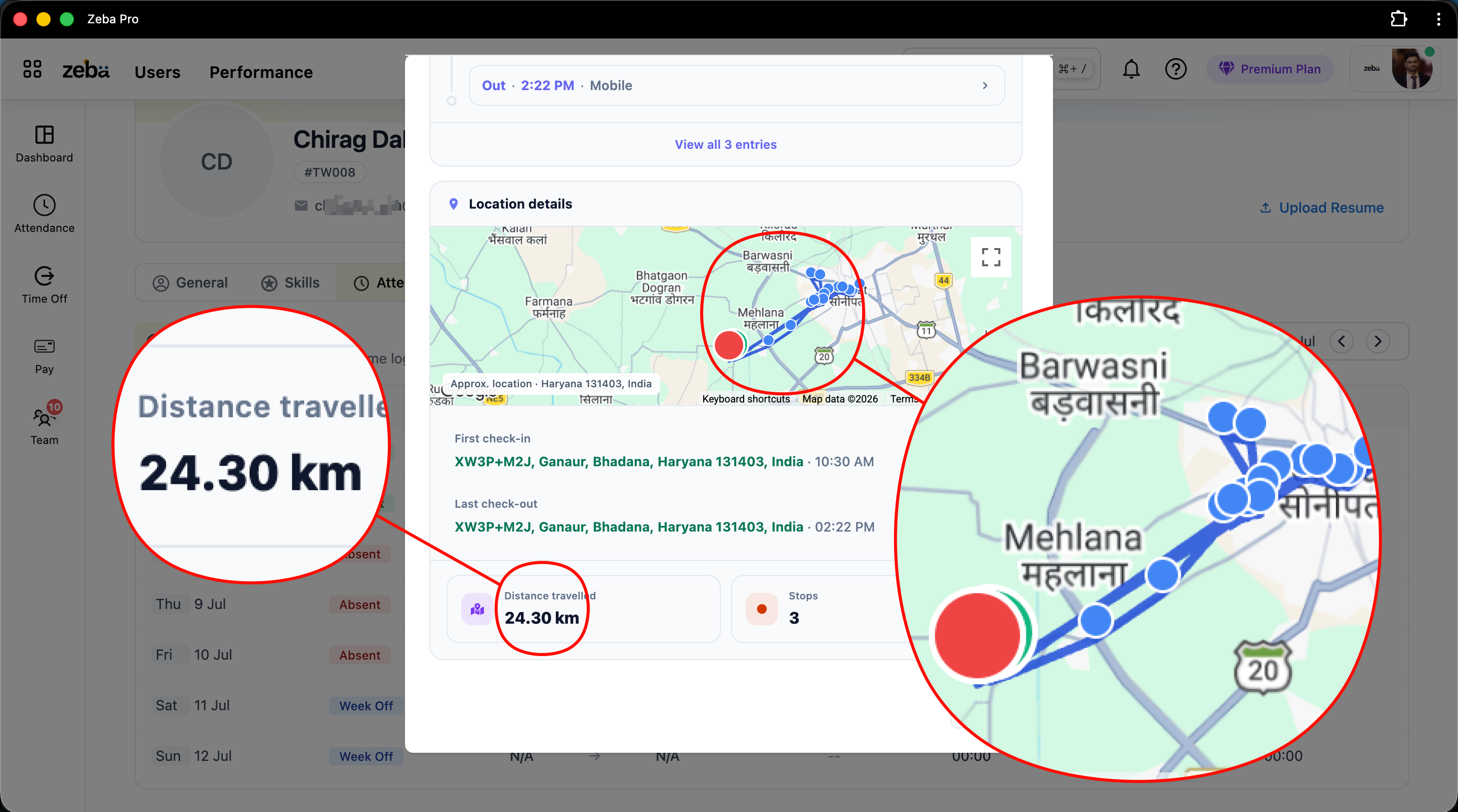
- How many kilometres did they travel?
That's one reason we connected field attendance and continuous location tracking inside Zeba Pro. When an eligible field employee checks in through the mobile app and has given the required location permission, their working session can start being tracked.
The manager doesn't need to call: "Where are you right now?" They can check the Team view. And importantly, the employee doesn't have to separately report every movement either.
A Field Salesperson's Day Should Look Something Like This
Let's use a realistic example. A salesperson leaves home at the beginning of their working day.
- 9:00 AM: Check-in: They open Zeba Pro and check in. For an employee assigned to continuous field tracking, the required location permission needs to be available. Their attendance starts. Location tracking starts.
- 9:45 AM: First customer: The salesperson reaches the first customer. They spend approximately two hours there. Instead of only seeing a GPS point, the manager can later understand that the employee remained around that location for that period.
- 11:45 AM: Travel: The employee leaves and travels toward another customer. Zeba Pro continues receiving location updates during the active working session. The distance travelled during the day continues accumulating.
- Afternoon: More customer visits: The employee continues their field work. The manager can see their location, and the employee's route creates a useful record of the day's movement.
- End of work: Checkout: The salesperson finishes their work and checks out. Location tracking stops.
Their attendance information remains part of the same HRMS that will eventually be used when payroll is processed. That last part matters. Because field tracking shouldn't create another dataset HR teams have to manually reconcile at the end of every month.
Field Attendance Is Different From Office Attendance
One mistake HR software can make is assuming every employee should follow almost the same attendance process. They shouldn't.
Consider an employee working at a manufacturing plant. The company may want the employee to check in within the designated factory location. Geofencing makes sense.
Now consider a salesperson. Today they're meeting a customer in Gurugram. Tomorrow they're visiting three locations in Delhi. The next day they're somewhere else. Requiring that employee to check in from one fixed office geofence defeats the purpose of field work.
That's why we distinguish these situations using Zeba Pro's user management configurations and Field Work policies. A company can use a controlled geofenced check-in where that's appropriate. Or it can allow field check-in for employees whose jobs require mobility. And continuous location tracking can be configured for the field-work scenario where the business genuinely needs it.
The HR policy (often approved in conjunction with your legal team) should match the job. Not the other way around.
Don't Make Field Employees Report the Same Information Twice
This is where companies can unintentionally create unnecessary work.
Imagine the system already knows:
- An employee checked in at 9:03 AM.
- The employee travelled 62 km.
- They visited several locations.
- They checked out at 6:01 PM.
- Their attendance is recorded.
Now imagine asking the employee to separately send: "Please share today's travel details." Then they enter the same information into another reimbursement process. Then HR exports their attendance. Then payroll needs attendance information separately.
We should be trying to remove these duplicate processes. For example, one reason we calculate distance travelled is because that information is useful to the employee, not only the manager. The employee can see how many kilometres they travelled during the working day and use that information when calculating the reimbursement they need to raise.
That changes tracking from "The company is watching me" to something that can also provide: "Here's a record that supports the work and travel I actually did."
To me, that's a much healthier way to design field workforce software.
How Do You Know If a Field Employee Stops Location Tracking?
This is an important practical question. Phones aren't GPS devices permanently attached to employees.
An employee can close an application. The operating system can affect background activity. A phone can run low on battery. Location services can stop. So simply showing a location pin without telling managers whether the information is still current can create false confidence.
In Zeba Pro, the mobile application provides location updates during an active tracking session based on approximately 30-second intervals or a 50-metre location change. We also capture useful device context such as battery information.
If an employee closes the application from the background while they're still checked in, Zeba Pro can detect inactivity. The employee can receive a notification and an email so they know something needs attention. And if the inactivity continues for around 30 minutes, companies that enable the relevant configuration can also notify the manager.
That gives the employee an opportunity to fix the problem before the situation automatically becomes "Employee isn't working." Because sometimes the actual explanation is simply "The application stopped sending location." Those aren't the same thing.
Managers Shouldn't Have to Become HRMS Experts
This applies particularly strongly to field teams.
A sales manager's primary job is sales. A service manager's primary job is service operations. A manufacturing supervisor's primary job is running their team. They're not supposed to spend their day navigating an HRMS.
That's why we've tried to bring the most relevant employee information together under the Team view in Zeba Pro. A manager can work with things such as attendance, leaves, live location, requests, and team information from the same area.
If they need to understand an individual employee more deeply, they can open that employee's profile. From there, information can include: Shift, Attendance, Time logs, Late arrival, Total hours, Breaks, Overtime, Location, Work summary, Skills, Documents, and Exit information.
I don't believe managers should need five applications to understand one employee.
Field Employee Tracking Can Also Reduce Reimbursement Disputes
This was one of the original customer problems that pushed us toward building the feature.
Imagine an employee submits a travel reimbursement for 87 km. How does the company verify it?
You can trust the employee completely, but you're still building a financial process (which can eventually impact income tax calculations based on allowance structures) around a number manually reported by a person.
Manual reporting can create mistakes, even when everyone is acting in good faith. Maybe the employee estimated the distance. Maybe they forgot one trip. Maybe they added personal travel accidentally. Maybe they simply don't remember.
A location history provides another source of information. Zeba Pro can calculate the distance recorded during the employee's field-work session. Now the employee has something to reference when raising their reimbursement, and the company has something to verify against. It reduces unnecessary ambiguity for both sides.
What If the Employee Wants to Take a Break?
This is exactly where field employee tracking can become employee surveillance if software companies aren't careful.
My view is that companies should have visibility into field work. They shouldn't get unlimited visibility into someone's life just because that person works for them.
An employee can check out. Tracking stops. If their working pattern requires it, they can check in again later. And even if someone forgets to check out, Zeba Pro doesn't continue tracking indefinitely.
We've placed a maximum tracking window of 9 hours from check-in. After that, tracking stops. That's intentional. If an employee checked in in the morning, finished work, and forgot to check out, the employer shouldn't keep receiving that person's location late into the evening.
Field Employee Management Isn't Just GPS Tracking
This is where I'd be careful when choosing field employee tracking software. A map looks impressive during a demo. But ask what happens around the map:
- Does the system know the employee's attendance?
- Can the manager see their working hours?
- Does it understand shifts?
- Can it show distance travelled?
- Can the employee use that distance for reimbursement?
- Can managers see the historical route?
- Can it identify tracking inactivity?
- What happens when the employee checks out?
- What happens if they forget to check out?
- Can managers see leave and attendance alongside field information?
- Does attendance eventually reach payroll?
Those questions are much closer to the actual business problem.
Why We Built Field Employee Tracking Inside Zeba Pro Instead of Another App
There are plenty of dedicated field staff tracking apps available. Our goal isn't to pretend they don't exist. The question we asked ourselves was different:
If a company already uses Zeba Pro to manage its employees, why should the same company need another application just to understand field work?
Another application means another login. Another employee database. Another interface managers have to understand. And another place where information becomes disconnected.
We've built live tracking as an add-on within Zeba Pro instead. The employee still uses Zeba Pro. The manager still uses Zeba Pro. And the field-work information sits alongside the employee's other HR information.
You don't need to turn your IT team's technology stack into: HRMS + Attendance App + Field Tracking App + Leave Tool + Payroll Tool. Potentially requiring multiple vendor checks and another pricing subscription. That's exactly the type of fragmentation we're trying to remove.
Who Actually Needs Field Employee Tracking?
I wouldn't recommend continuous tracking simply because your HRMS supports it. It makes sense when location is relevant to someone's actual work.
Typical examples include:
- Field sales teams visiting customers
- Service technicians travelling between jobs
- Installation and maintenance teams
- Employees working across multiple customer sites
- Field operations teams
- Other employees whose working day involves regular travel
For someone working at the same desk every day, continuous GPS tracking may not add much beyond a sensible attendance policy. For a field employee, it can answer operational questions that attendance alone cannot. That's the distinction I'd use.
How I'd Evaluate Field Employee Management Software
If you're currently comparing field employee management software, I'd ask the vendor to show you one employee's entire day. Not individual feature demos. I'd ask: "Show me what happens from the moment my salesperson starts work until payroll."
- Can the employee check in from the field?
- What location gets captured?
- Can the manager see them?
- Can you see where they travelled?
- Can you calculate kilometres?
- Can you understand how long they stayed somewhere?
- What happens if tracking becomes inactive?
- What happens when they check out?
- Where does attendance go?
- How does HR access it?
- How does payroll use it?
That's the demo I'd want. Because you're not actually buying a map with dots on it. You're trying to manage a field workforce.
What We're Trying to Do Differently With Zeba Pro
Building this feature reminded me of something I've learned again and again while building Zeba Pro. Customers rarely ask for a feature because they want another button. There's usually an operational problem underneath it.
Our customer didn't really need "Live GPS Tracking." They needed to know:
- Where is my field team?
- How much did they travel?
- Can I verify their field work?
- Can employees accurately claim their travel?
And they needed those answers without introducing even more complexity into their HR processes. That's why we've tried to connect field tracking with the employee's actual working day:
Check-in → Attendance → Live Location → Customer Visits → Distance Travelled → Checkout → Attendance → Payroll
While keeping the rest of their HR information in the same place. For me, that's ultimately what good field employee management software should accomplish. Not by giving managers another dashboard to watch, but by giving managers the information they need without constantly asking employees for it. And giving employees a clear record of the work they've actually done.


