


Live Location Tracking for Employees Without Paying for Another Tool
If you have field employees and want to know where they are during working hours, you don't necessarily need to buy a separate employee tracking tool.
We built live location tracking for employees directly into Zeba Pro so companies can see an employee's current location, route travelled, distance covered and time spent at different locations, all alongside attendance tracking, leave management, shifts, documents, requests and payroll information.
But there was one condition I was quite particular about when we built it: Location tracking should end when work ends.
In Zeba Pro, continuous tracking starts after an eligible field employee checks in and grants the required location permission. It stops when they check out, and we've put a maximum tracking window of 9 hours from check-in so that forgetting to check out doesn't mean an employee continues being tracked indefinitely.
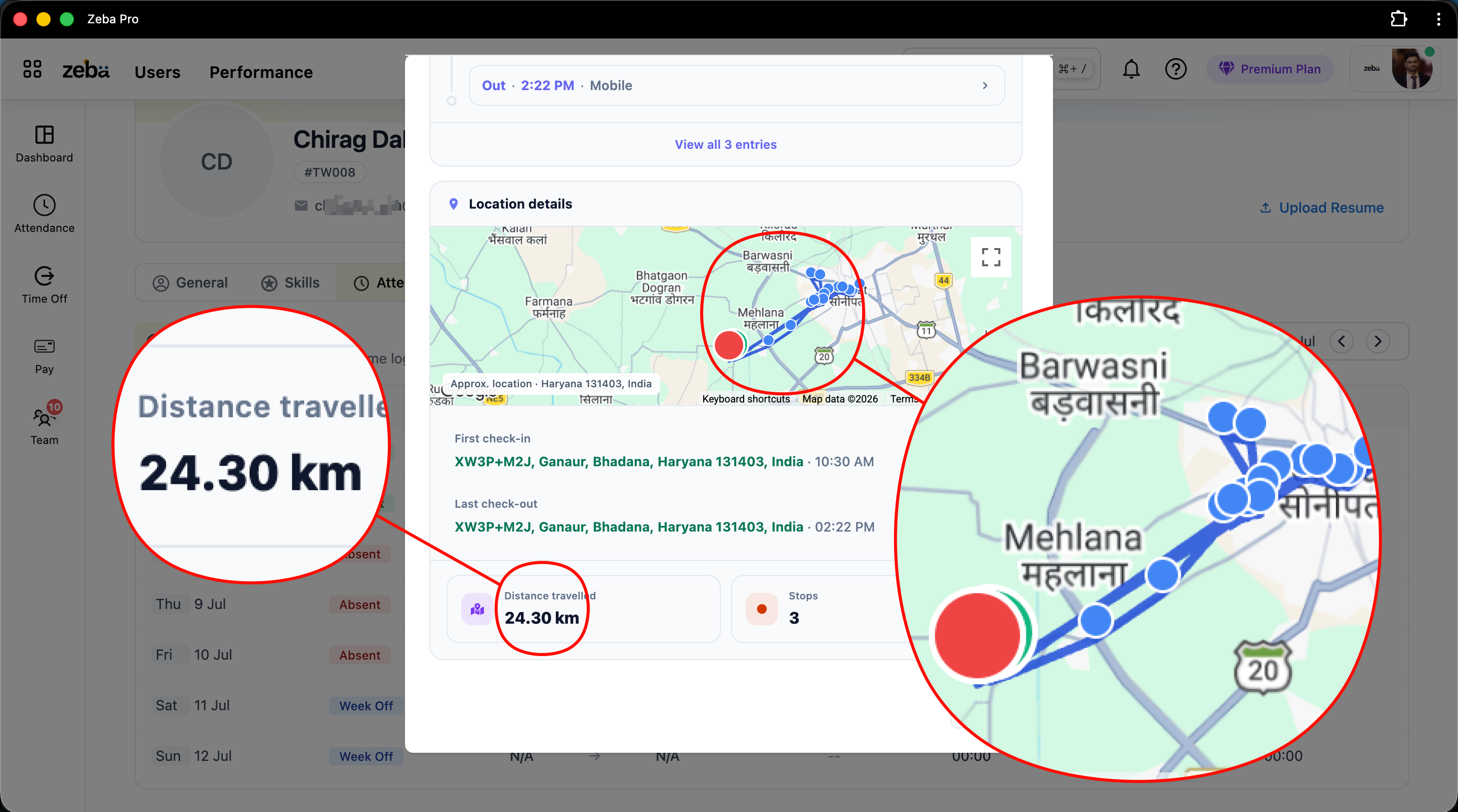
We didn't build this just because GPS tracking looks good on an HRMS feature list. A customer conversation changed our priority.
A Customer Asked Us a Question We Couldn't Ignore
The way we build Zeba Pro is shaped a lot by what customers keep asking us for, especially growing startups with mobile workforces.
One request can be an edge case. But when multiple customers start asking for the same thing, I pay attention.
During one of our demos, a customer explained their problem roughly like this: "We mostly have field employees, and we don't get a clear understanding of where our field employees are, how many kilometres they have travelled today for reimbursements, and whether what they're telling us about their field work is accurate."
That triggered a larger conversation within our team. We already handled HR processes. But if you're building an HRMS for companies with field employees, an attendance entry that only says "Checked in: 9:06 AM" doesn't necessarily give the company enough information.
- Where did the employee work?
- How much did they travel?
- How long were they at a customer location?
- How much travel reimbursement should the finance team approve?
- And, from the employee's perspective, how do they prove the distance they actually travelled?
That's when live tracking became much more important on our roadmap.
How Zeba Pro's Live Employee Location Tracking Works
We didn't want employees installing one application for HR and another application just so their company could track field work. So live location tracking is connected directly to field-work attendance inside Zeba Pro.
An organization can configure a Field Work user management policy and enable Continuous Location Tracking for employees assigned to it. The employee then uses the Zeba Pro mobile app.
When the employee checks in, they must provide the required location permission. Once checked in, continuous location tracking begins. While the employee is working, the mobile app sends location updates to Zeba Pro based on either approximately every 30 seconds or a 50-metre change in location.
The system can then provide managers with information including:
- Current employee location
- Route travelled during the day
- Total distance travelled
- Time spent at locations
- Check-in status
- Tracking activity/inactivity
- Mobile device information
- Phone battery level
That last one might sound like an unnecessarily small detail. It's actually quite useful. If you're relying on a phone to provide location information throughout field work, a phone running out of battery can suddenly create a large gap in tracking. Giving the manager visibility into battery status provides useful context instead of simply showing that an employee has disappeared from the map.
The Employee Gets Something Useful From Tracking Too
I think employee tracking becomes problematic when all of the value flows in one direction. The company tracks, and the employee only gets tracked. We wanted the information to be useful to both sides.
One obvious example is travel reimbursement (which can sometimes impact allowances managed via an income tax calculator). The employee can see how many kilometres they travelled during the day.
Instead of the employee saying, "I think I travelled around 64 km today," and the company wondering whether that figure is accurate, there is a record of the day's movement. The employee has information to support the reimbursement they raise. The company has information to verify it. That removes an unnecessary trust problem between the two.
Managers Can See the Employee's Complete Route, Not Just a Location Pin
A live dot on a map solves only one question: Where is this person right now?
For field work, historical context can be equally useful. Suppose a salesperson visits three customers during the day. The manager may need to understand where they travelled, how many kilometres they covered, and how long they stayed at a particular location.
Zeba Pro keeps the day's route information so managers can review the employee's movement instead of only seeing their current position. For example, if the employee arrived at a customer location and remained there for approximately two hours, that becomes part of the day's location history.
And this is where I think employee location tracking becomes much more useful than simply putting someone's GPS coordinates on a screen.
What Happens When an Employee Disables the App During Field Work?
This was another scenario we had to think through.
An employee could check in and then close the application from the background. If the system simply stopped receiving locations without saying anything, the manager might assume everything was still working.
So Zeba Pro can identify tracking inactivity. The employee can receive notifications/emails informing them about the inactivity. If the employee remains inactive for around 30 minutes, organizations that enable this setting can also notify the manager.
The distinction here is important. This applies while the employee is checked in. If they've legitimately finished or paused their working session by checking out, we shouldn't treat that as suspicious inactivity. Employees can also have multiple check-in/check-out sessions during a day.
Why We Stop Tracking Employees After 9 Hours
This was a product decision rather than a technical limitation, and a best practice often recommended by any corporate legal team.
Imagine someone checks in at 9 AM. They complete their work. They go home. But they forget to check out of the HRMS. Should their employer continue receiving their location that evening? I don't think so.
That's why we've designed continuous tracking with a maximum 9-hour tracking window from check-in. Checkout stops tracking as well. An employee can also end a session and check in again later if their workday needs multiple sessions.
My view is fairly straightforward. A company may have a valid reason to track an employee during field work, but that doesn't mean it should track them indefinitely. We have to build tools that companies need while also making employees feel safe using them. There will always be organizations asking software companies for greater control. That doesn't mean every request should be built.
Live Location Tracking vs Geofencing: They Solve Different Problems
These two features are sometimes treated as if they're interchangeable. They're not.
- Geofencing answers: "Was the employee at an approved location when they checked in?"
- Continuous location tracking answers: "Where did the employee travel while they were working?"
That's why Zeba Pro's Field Work configuration can support different approaches. For employees expected to work from controlled locations, an organization may require a geofenced check-in. For mobile field employees visiting customers and moving between locations, the organization can allow field check-in and use continuous tracking where appropriate.
A salesperson travelling between five customers doesn't have the same attendance requirements as an employee working from one factory. Your HRMS shouldn't pretend they do.
Why Buy Another Employee Tracking App If Your HRMS Can Already Do It?
This is where I think businesses should look beyond the separate pricing of the tracking application itself.
There are dedicated field employee tracking apps offering combinations of GPS attendance, live tracking, route histories and distance calculation. Some products also sell tracking as a separate paid product or plan. One currently advertises its field tracking at ₹180 per user per month in addition to its attendance plan.
But my bigger concern isn't only another subscription. It's another disconnected system straining your IT team. Imagine your company has:
- HRMS → Employee information
- Attendance software → Attendance
- Tracking app → Field locations
- Leave system → Leaves
- Payroll → Salary
Now HR teams or operations have to connect those systems. With Zeba Pro, we're trying to approach it differently.
A manager can open their Team view and work with Attendance + Leaves + Live Location + Requests + Employee information without jumping between different products. And if they need deeper information about one employee, they can go to that person's profile and see things such as their attendance, shift, time logs, late arrival, total working hours, breaks, overtime, location, work summary, skills, documents and exit information.
That's what I mean when I talk about building an integrated HRMS. Integration shouldn't mean "We have 20 items in the sidebar." It should mean that those 20 things understand the same employee and work together.
Live Employee Location Tracking and Payroll Shouldn't Be Strangers
This is another reason I wanted tracking inside the HRMS. Consider a field salesperson's day. They leave home for work and check in through Zeba Pro.
- Check-in: location tracking begins.
- Travel: movement, route, and kilometres are recorded.
- Customer visit: location history provides context.
- Checkout: tracking stops.
Meanwhile, their attendance is already part of Zeba Pro. And when payroll automation is eventually processed, payroll has access to the employee's attendance information.
We aren't asking HR to download attendance from one application, collect leave information from another system, and then send another Excel file to payroll. That connection is far more interesting to me than GPS tracking by itself.
Should You Use Live Location Tracking for Every Employee?
No.
And I think that's important to say even though we sell the feature. If someone sits at the same desk from 9 AM to 6 PM every day, continuously tracking their GPS location may provide very little additional business value. There are better attendance mechanisms for those situations.
Live location tracking makes much more sense for mid-market businesses and enterprises whose work itself involves movement, such as:
- Field sales employees
- Service technicians
- On-site teams
- Employees visiting multiple customer locations
- Field operations teams
- Other mobile workforces
Even then, the business should have a clear reason for collecting location information. "Because we can" isn't a particularly good one.
What I Would Look For in Employee Location Tracking Software
If I were evaluating a live location tracking solution for field employees, I wouldn't stop at asking whether it offers GPS tracking. I'd want answers to these questions:
- When exactly does tracking start and stop?
- What happens if the employee forgets to check out?
- Can employees see their own distance travelled?
- Can managers see historical routes, not just current location?
- Can it identify periods when tracking stops unexpectedly?
- Does it show how long someone remained at a location?
- Can it support travel reimbursement?
- Is location connected with attendance?
- Does attendance eventually connect with payroll?
- Do I need another application and another subscription to manage all of this?
The last three are where we've deliberately taken Zeba Pro in a different direction.
What We're Trying to Solve With Zeba Pro
When that customer told us, "We mostly have field employees..." the interesting part wasn't simply that they wanted GPS. They wanted clarity.
The company wanted to understand what was happening in the field. The employee needed a record of their travel. The manager needed visibility without constantly calling people. HR needed attendance. And eventually payroll needed accurate attendance information.
We could have treated location tracking as an isolated feature. Instead, we've tried to make it another part of the employee's workday inside Zeba Pro.
Check in. Work. Travel. Visit customers. Check out. Attendance reaches payroll.
The manager gets visibility. The employee gets a record of their day and kilometres travelled. And the company doesn't need to introduce another standalone tool just to understand what its field team is doing.
For me, that's the bigger opportunity with HRMS software. Don't keep adding more tools for employees to learn. Make the tools they already have work better together.


