
Not an order or quote tool
Zeba records the visit, not the sale. Keep orders and quotes in your sales tool.
Site visit management software
Plan which customers each person visits, let them mark every visit from the site with a photo and a note, and see planned against done the same day. The same check-in carries into attendance, kilometres and payroll.
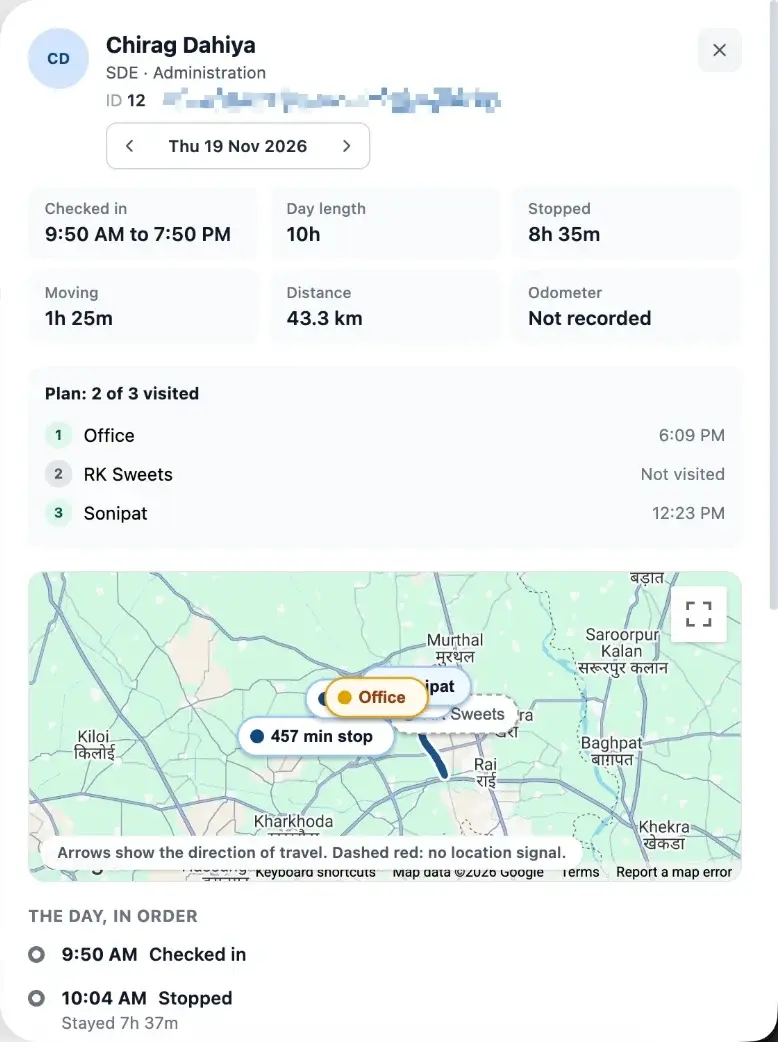
Planned against done
2 of 3 customers visited
Shown on the person's day
Which tool do you need
People searching for site visit software usually want one of three things. Some need a template to write up a visit. Some need a sales tool that books orders. Others, and this is the page for them, need to know that planned visits actually happened and what came out of them.
Zeba is built for the third need. A manager plans the day, the person marks each visit from the customer's site with a photo and a note, and the manager reviews planned against done. It does not book orders, send quotes or optimise routes.
If you only need something to print, our free site visit report card covers that. If you also need to pay the field team correctly, the visits, kilometres and attendance already sit in the same system, and field force management explains how they connect to payroll.
One visit day
If your visit reporting lives in chat messages and evening calls, the gap is the process, not the people.
Before the day
A plan sent on WhatsApp that nobody can check later
The manager sets each person's customers for the day, in route order or any order. The person sees it on the phone.
At the customer
A phone call saying the visit is done
The person marks the visit from the site with a photo and a note. Zeba stores where it was marked from and how far that is from the customer.
End of day
Gaps found at month end, when nothing can be fixed
The manager sees planned against done for every person, the visits marked far from the customer, and customers not visited for the longest.
The planner
Every person is a row and every day a cell. Open a cell to add customers, choose route order or any order, or copy last week. Past days show how many planned visits were completed.
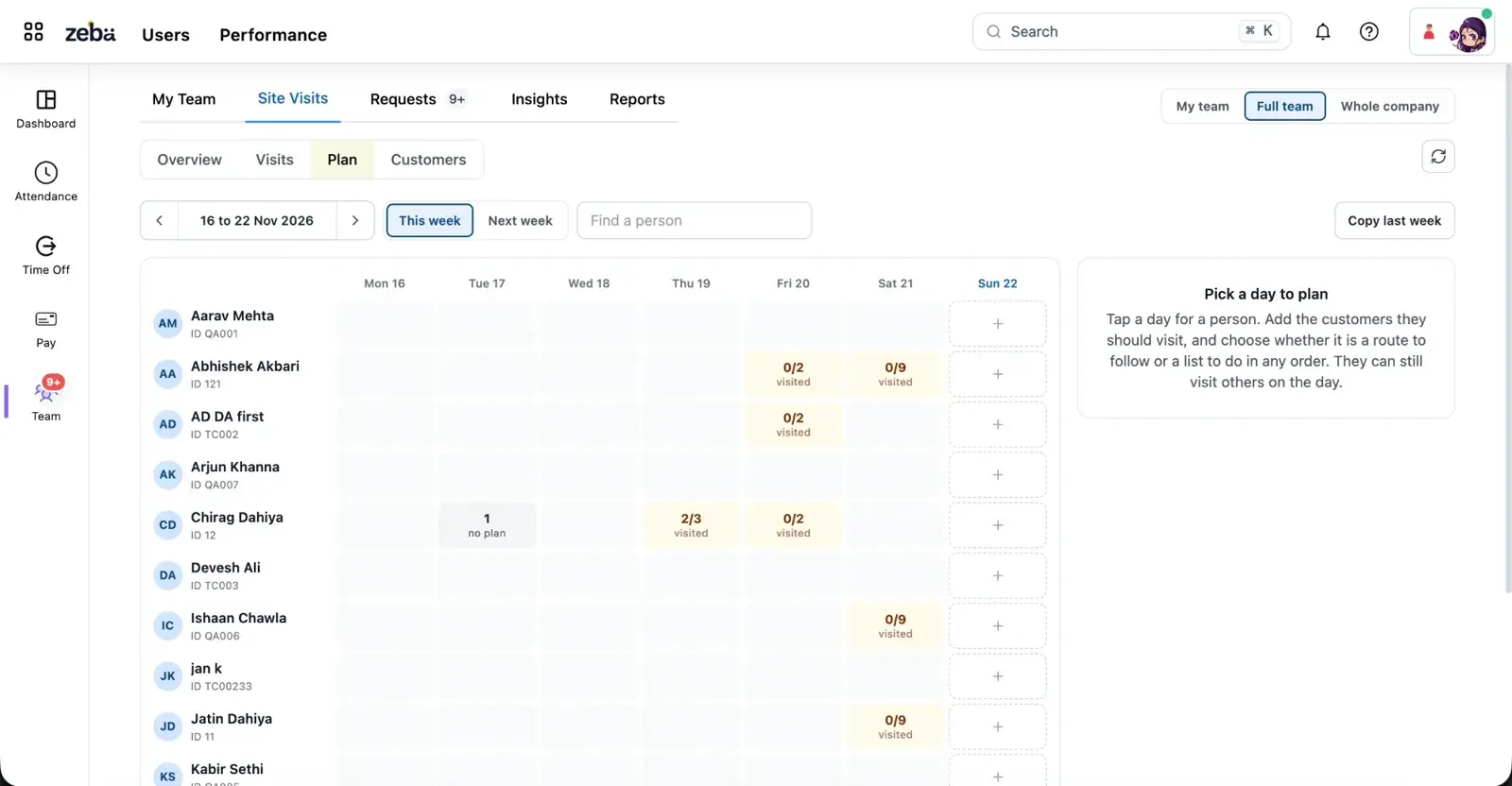
A plan for each person and day
Pick customers from your own list on a week grid. Set a route order or any order, copy last week, and see suggestions of customers not visited for the longest.
Visit proof from the phone
The person marks the visit with a photo, a note and the position it was marked from, with the distance from the customer's location.
Planned against done
The day board shows each person's planned visits, completed visits, off plan visits and visits that need a manager's check.
One person's day as a timeline
Check-in, time at each place, each drive with its time and distance, photos, notes and odometer readings with photos.
Customers added on the spot
A new customer created from the phone is marked as added on the spot, separate from the customers your company set up.
Reports and the same system as pay
People by days grid, busiest customers, team table and PDF. The same check-in feeds attendance, kilometres and payroll.
Proof, in order
Open any person and any date. You see check-in and day length, time moving and stopped, distance, the plan with each customer's state, the route, and every visit with its photo and note.
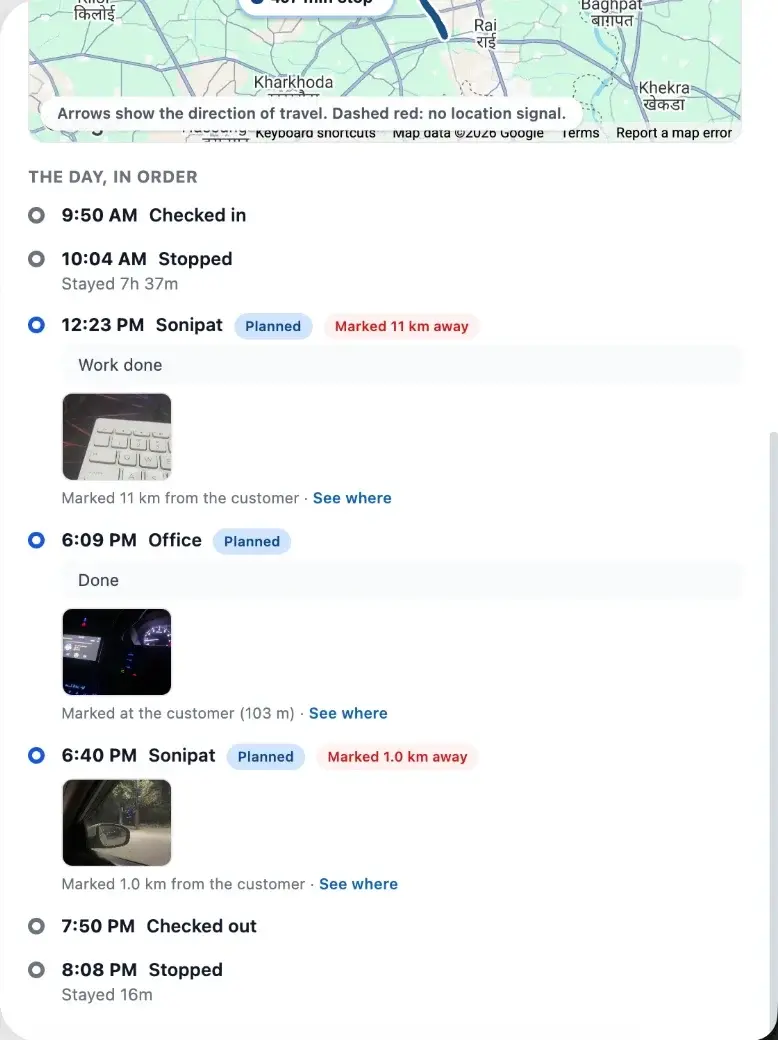
Distance comes from the recorded route. Read how Zeba calculates GPS distance for how it is filtered.
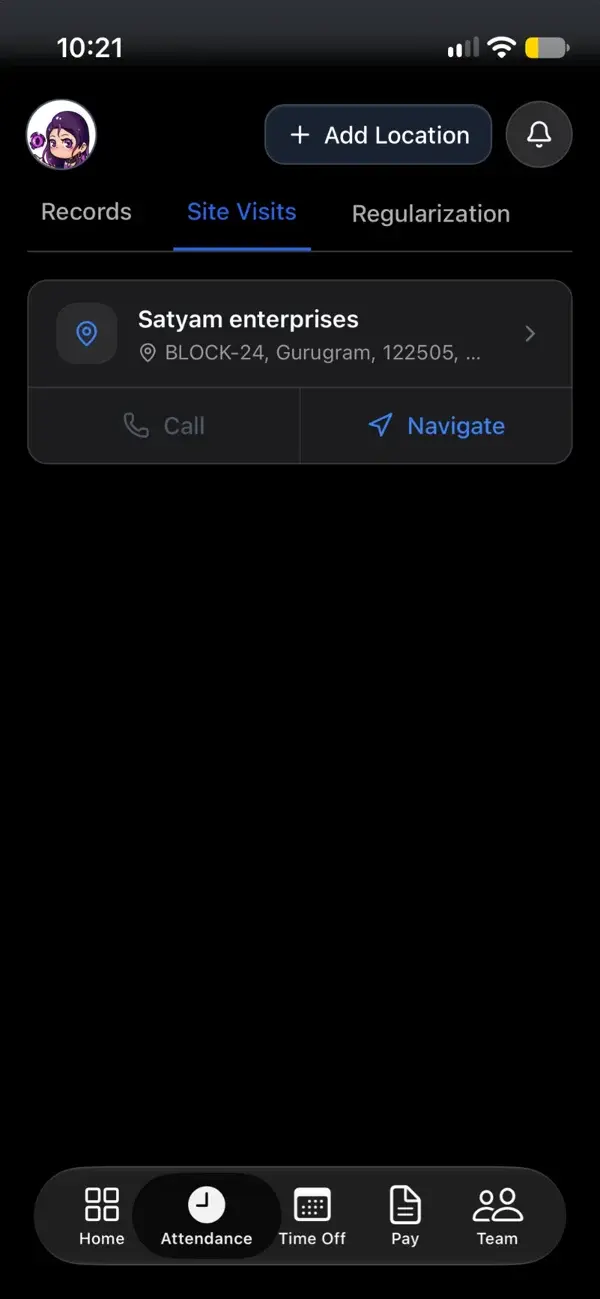
On the phone
The Site Visits tab in the Attendance section lists the customers a person visits. Each card has the address, a Call button and a Navigate button. Add Location lets the person add a customer they are at, which Zeba marks as added on the spot.
When a plan exists for the day, it shows on the dashboard, and the person is notified when it changes for today or tomorrow.
Who uses what
Pick a role to see what changes.
Field manager
Today
Plans live in chat messages. You call each person to ask where they are and rebuild the day from their answers.
With Zeba
You plan from a week grid, see each person's planned and completed visits on the day board, and open any person's day as a timeline.
What it is not
We would rather you know before the demo. Keep these in a dedicated tool and use Zeba for the proof and the pay that follows from it.
Zeba records the visit, not the sale. Keep orders and quotes in your sales tool.
There are no deals or stages. A visit has a customer, a time, a position, a photo and a note.
A manager chooses the order of a day. Zeba does not calculate the best route or assign jobs.
For how this fits with the people side of a field team, read field force management software.
Chat and sheets vs Zeba
The usual story
With Zeba
Visit plan sent on WhatsApp or a sheet
A plan per person and day, shown on the phone and updated with a notification
Visit reported by phone call
Photo, note and position marked from the customer's site
Which customer was skipped, found at month end
Planned against done every day, with customers not visited for longest suggested
Visit sheets typed up in the evening
A timeline of the day built from the phone, ready to export as PDF
Visits, attendance and kilometres in three places
One check-in drives attendance, visits, kilometres and payroll
Live Location Cluster
Tell us who visits whom and how often. We will set up your customer list and a week of plans so you can see planned against done on your own data.
Buyer questions
Plans, proof, tracking and what Zeba does not do, answered plainly.