
Free printable - one page
Site visit report format with a promises ledger
Most visit report formats are a table of blank lines. This one is a single A4 card built around what a manager needs after the visit: proof from the site, what the customer asked and pushed back on, how strong the visit was, and who owes what by when.
PDF with a blank card and a worked example. No signup, no watermark.
Download
The site visit report card
Site visit report card (PDF, 2 pages)
Page 1 is the blank card to print. Page 2 is the same card filled in for a made-up visit to a hardware dealer, so your team sees what a good one looks like.
Best for: sales, service, collection, delivery and audit visits.
Download PDF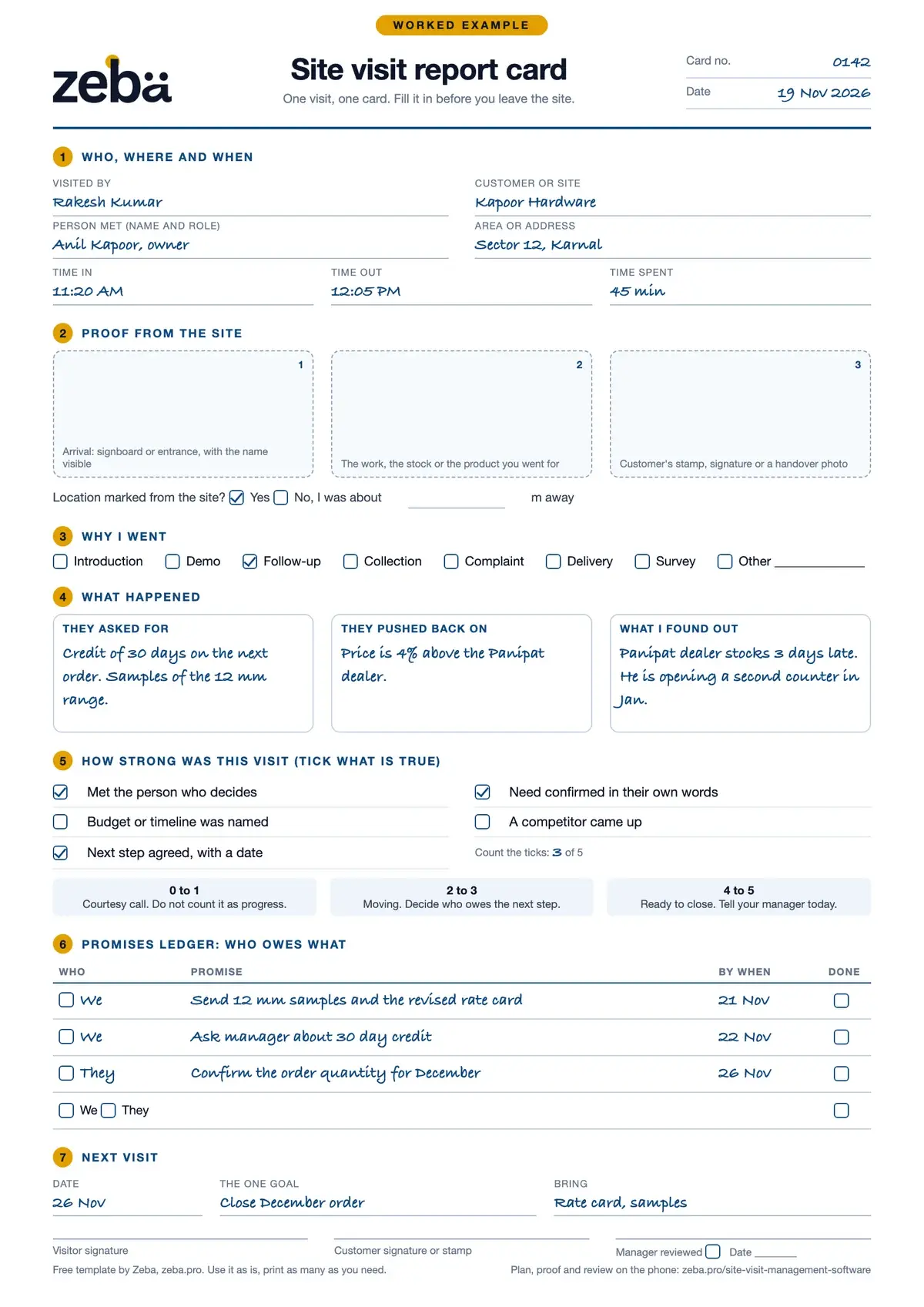
Anatomy
Seven parts, and why each one is there
- 1
Who, where and when
Names the visitor, the customer, the person actually met and the time in and out. Time spent is the first thing a manager checks and the one thing a report written from memory gets wrong.
- 2
Proof from the site
Three frames: arrival with the name visible, the work or product, and the customer's stamp or a handover photo. Plus one line on whether the location was marked from the site, and how far away you were if it was not.
- 3
Why I went
One tick for the purpose. A collection visit, a complaint and a first introduction are judged differently, so the report should say which one it was before anything else.
- 4
What happened
Three short boxes instead of one blank page: what they asked for, what they pushed back on, and what you found out. People write more useful notes when the question is specific.
- 5
How strong was this visit
Five yes or no signals: met the decision maker, need confirmed in their words, budget or timeline named, a competitor came up, next step agreed with a date. The count separates a courtesy call from a visit that moved something.
- 6
Promises ledger
Who owes what, by when, and whether it is done. It lists promises from both sides, so the next visit starts from commitments instead of from memory.
- 7
Next visit
A date, one goal and what to bring. A visit report without a next step is a diary entry.
Writing it well
A report your manager can use, and one they cannot
Written from memory
Written on site
Met the owner, discussed products. Will revert.
Met Anil Kapoor, owner. Asked for 30 days credit and 12 mm samples. Says our rate is 4% above the Panipat dealer.
Customer interested.
Need confirmed in his words: second counter opening in January. Budget not named. Next step set for 26 Nov.
Follow up next week.
We owe samples and a revised rate card by 21 Nov. He owes the December quantity by 26 Nov.
The difference is specifics: a name, a number, a date. The three boxes in section 4 and the ledger in section 6 are there to force them.
By visit type
Which parts matter for which visit
First introduction
Lean on sections 4 and 5. Note who decides and what they use today.
Follow-up
Start from the promises ledger of the last card, tick what is done, add new promises.
Collection
Skip the strength check. Write the amount promised, the date and who promised it in the ledger.
Complaint
Use box 4 for what went wrong in their words. The ledger carries what you will fix and by when.
Delivery
Frame 3 matters most: stamp or signature at handover. Note any shortage or damage.
Survey or audit
Frames 1 and 2 are the evidence. Write observations in box 4 and measurements in the ledger.
Beyond paper
When cards stop scaling
Paper works for a handful of people. It stops when a manager needs to know by evening whether the planned customers were visited, when photos get lost, or when a visit is reported from somewhere other than the customer. Zeba's site visit management software keeps the same fields on the phone: a plan for each person and day, a photo and note for every visit, the position it was marked from and planned against done for the day. It sits with field staff tracking and km claims in the same system, and the daily sales report and beat plan pages cover the rest of the field day.
Got questions?
Site visit report: FAQs
What to write, how long it takes and when to move off paper.
- Who visited, which customer or site, who they met, time in and out, why they went, what happened, proof from the site, and what happens next. This card adds a promises ledger and a visit strength check, because those are what a manager actually acts on.
- About five minutes, on site, before leaving. The boxes are small on purpose. If it takes longer, the visit was probably two visits and should have two cards.
- A site visit report records a physical visit and the proof of it. A call report records a conversation and has no location. This card is for visits. If a call produced a promise, add it to the ledger of the next visit card.
- Yes. Pick the purpose in section 3. For deliveries, the customer's stamp in frame 3 is the evidence. For audits, frames 1 and 2 carry the evidence and box 4 carries observations. Skip the strength check where it does not apply.
- A photo with the customer's name visible is better than none, but a photo can be taken anywhere. Proof gets stronger when the photo carries a time and a location. On paper that is the time in and out you write down. In an app the position can be recorded when the visit is marked.
- Wherever your manager can search them by customer. A stack of cards in a bag is only a record until someone needs one. Once you have more than a handful of people visiting, moving the same fields into an app removes the retyping.
- Print it as it is, or use it as the model for your own. The seven parts are the point, and you can rename the purposes in section 3 to match your work.
More free tools
More free HR and payroll tools
Related to field teams, and the rest of the toolkit.
- Daily sales report formatDay close card with strike rate and selling time.
- Beat plan builderClasses, weekdays and how many reps the beat needs.
- Salary slip generatorPDF and Excel payslips with PF, ESI, PT and LOP.
- Attendance sheet format in ExcelMonthly register that calculates LOP and paid days.
- Offer letter formatOffer letter with a CTC annexure that adds up.
Replace the paper card with a plan, a photo and a position for every visit. Zeba records the visit on the phone and shows planned against done.