
Attendance management system
Attendance management system your team can use on day one
Employees punch in from a phone, a biometric machine or a geofenced site. Managers see it instantly. Payroll gets days it can pay. This page is the map: pick where you are and go straight to the part that matters.
Free trial. No credit card.
Punch, decide, correct, count, pay
The cost of doing it by hand
Running attendance on registers, chats and spreadsheets does not scale.
Take a team of 100 people on a 26 day month. That is 2,600 daily records to collect, check against shifts and leave, and turn into loss of pay before payroll can start. Every extra branch, shift or field team multiplies it.
By hand
2,600 records
a month for 100 people, before any corrections
Punches arrive from machines, phones and messages. Someone matches them to shifts and leave, fixes the missing ones and counts loss of pay in a spreadsheet, every month.
In Zeba
One record
per person per day, ruled and ready for payroll
Each punch is stored with where it came from. Your rules decide present, late, half day or absent, corrections go through approval, and payroll reads the same record.
Benefits
Attendance management system built for accurate days and tighter control.
Zeba helps HR and operations teams record attendance the way their people actually work, keep every correction on the record, and hand payroll days it can pay without rework.
Accuracy
Days that match the shift, not just the calendar.
Late marks, half days and absences follow the shift the person was on, including night shifts that cross midnight, so the right date gets the right punch.
Control
Rules you set once and corrections that leave a trail.
Choose how hours are counted, what minimum counts as a day, and whether weekends and holidays are blocked. Every regularization is requested, approved and recorded.
One record
Attendance, leave and payroll without a spreadsheet in the middle.
Leave, overtime and loss of pay sit with attendance, so the payroll run starts from days that are already counted.
Where do you want to start?
Pick your situation, go to the right page
Attendance looks different in an office, a plant and a field team. Each card below goes to the page that covers that case in full.
- My team punches from phonesCheck in and out from the Zeba app, with location checks where the work needs them.Mobile attendance app
- We already have biometric machinesKeep the device where it works and use the app everywhere else. Both land in one timeline.Biometric attendance
- Punches must happen on siteDraw a geofence around each office, plant or site and require the punch to happen inside it.Geofencing attendance
- Half my team works in the fieldLive location during working hours for field staff, with visits and kilometres in the same system.Live location tracking
- We run night and rotating shiftsPunches land on the right shift date, with buffers for early and late punches.Shift management
- I am comparing vendorsA plain look at what to ask any attendance vendor, and where Zeba fits.Best attendance software
From punch to payslip
One record, five steps
The difference between a punch machine and a system is what happens after the punch. In Zeba the same record carries through every step.
- 1
Capture
A punch from the app, a biometric device or a geofenced site, each tagged with where it came from. You can also require a live selfie with each punch. Zeba checks that it is live and does not match faces.
- 2
Decide
Rules decide whether the day counts: a late-mark buffer, a maximum tolerance, full-day and half-day hours, and whether hours matter or presence is enough.
- 3
Correct
Missed a punch? The employee requests a regularization, the manager approves it, and HR keeps the audit trail.
- 4
Count
Shifts, overtime and leave turn punches into payable days, including half days and overnight shifts.
- 5
Pay
The same record feeds the payroll run, so loss of pay is not rebuilt in a spreadsheet at month end.
What a system includes
More than a punch, less than a project
Most attendance systems are built for the vendor, not for the person who has to run them. These are the parts that make the difference.
Multi-mode capture
Web, mobile, geofence and optional live GPS by work type. One attendance management system, not four disconnected tools.
Mobile attendanceRules you set once
Late marks, half days and whether hours or presence decide the day, assigned by department, location or person.
See the rulesShift and roster awareness
Late marks and absences respect the shift the person was on, including overnight buffers for the correct date.
Shift managementSelf-service corrections
Employees request corrections, managers approve, and HR keeps the audit trail before payroll locks.
RegularizationLeave and attendance together
Leave, half days and working days sit with attendance, so loss of pay is not a separate spreadsheet exercise.
Attendance and leaveStraight into payroll
Working days, overtime and loss of pay feed the payroll run, which makes the payslip and Form 16 follow from the same data.
Payslips and Form 16
How the attendance management system works
Capture, decide, correct and count, in one place.
Zeba applies one set of rules to every punch, whatever device it came from, and keeps the result in a record that leave and payroll can read. These are the parts, each with its own page.
Rules
Your policy becomes the rule for every day.
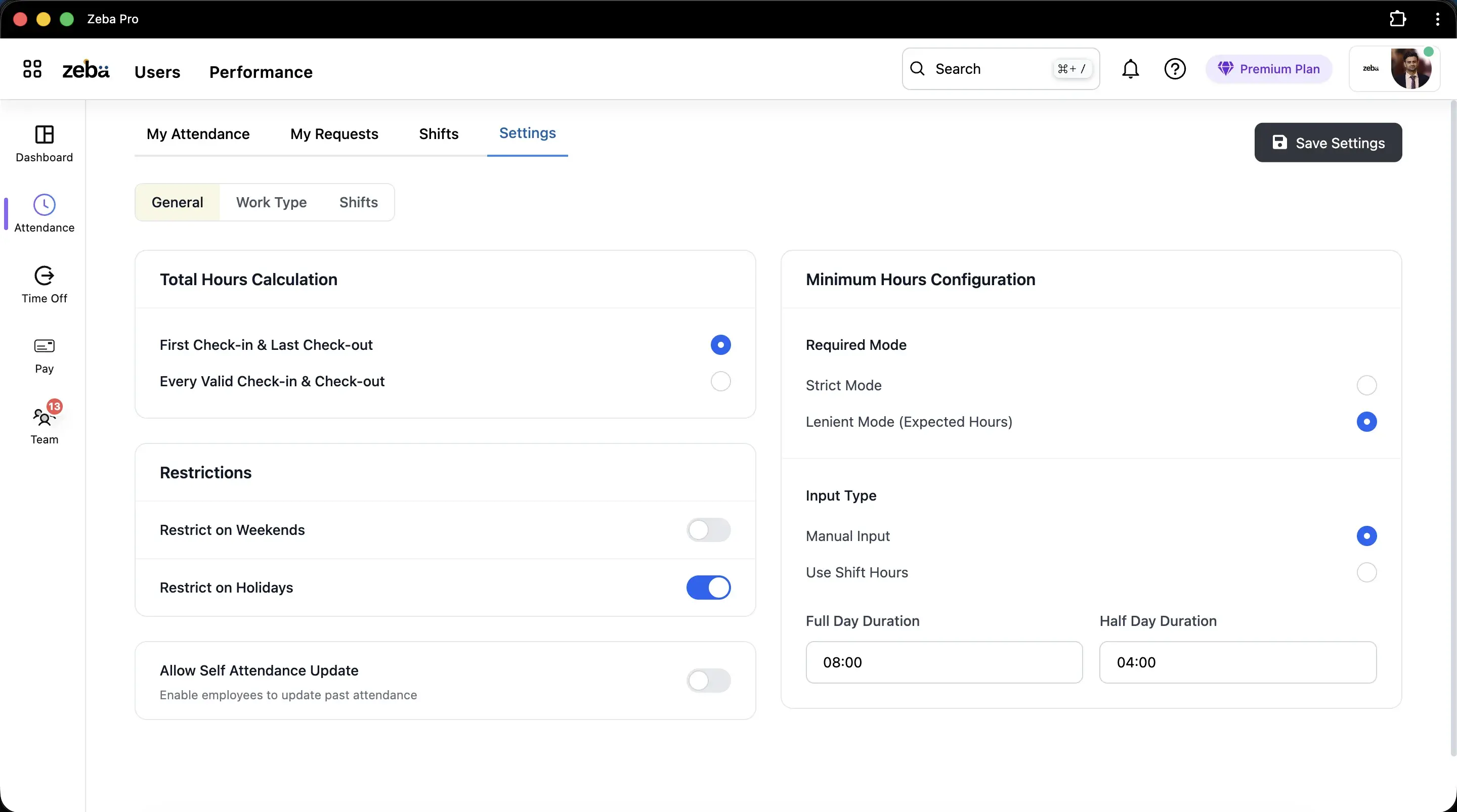
Attendance settings let HR decide how a day is counted once, instead of judging each day by hand. The same screen controls what employees can and cannot do.
- Total hours: count from the first check-in to the last check-out, or add up every valid check-in and check-out pair.
- Minimum hours: choose strict mode or lenient mode, enter full day and half day durations by hand or take them from the shift.
- Restrictions: block attendance on weekends or holidays when your policy says so.
- Past attendance: decide whether employees may update their own past attendance or must raise a request.
Shifts
Shifts that know who is on which day.
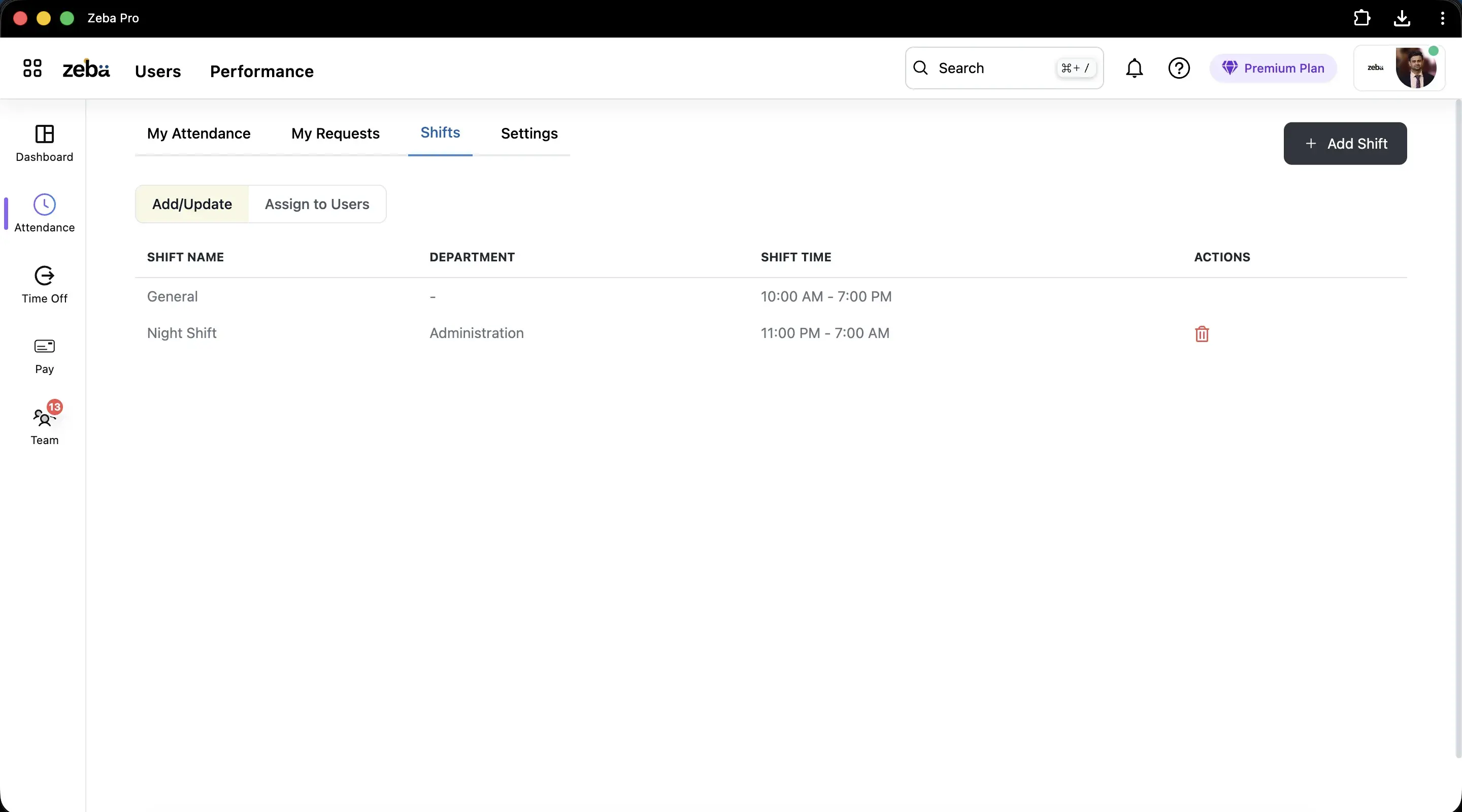
Create the shifts your business runs, then assign them to people. Late marks, overtime and absences are judged against the shift the person was meant to work.
- Shift list: add day and night shifts with their timings, optionally for a department.
- Assign to users: put each person on a shift so the rules judge their day correctly.
- Night shifts: an overnight shift keeps its punches on the right working date.
- Work types: give office, field and remote roles different punch rules.
Corrections
Missed a punch? Ask, approve, keep the record.
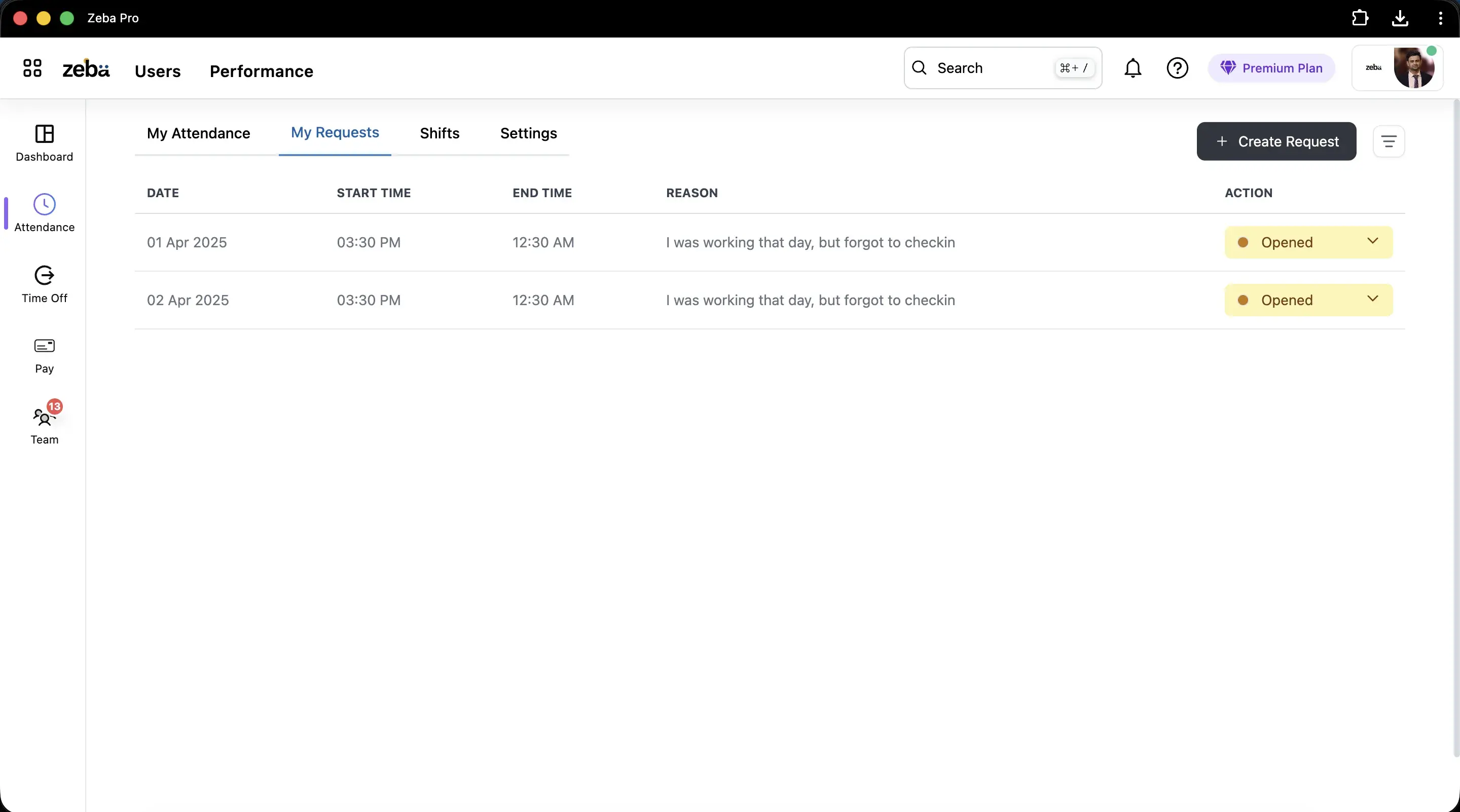
Employees forget to check in. Zeba does not ask HR to edit the register quietly. The employee raises a request with a reason, a manager approves it and the change is on the record.
- Requests: start and end time with a reason, visible as opened, approved or rejected.
- Approval: managers see requests waiting for them in one list.
- Audit trail: HR can see what changed, who approved it and when.
- Payroll: an approved correction updates the attendance that payroll uses.
Location
Where the punch happened, and where the day went.
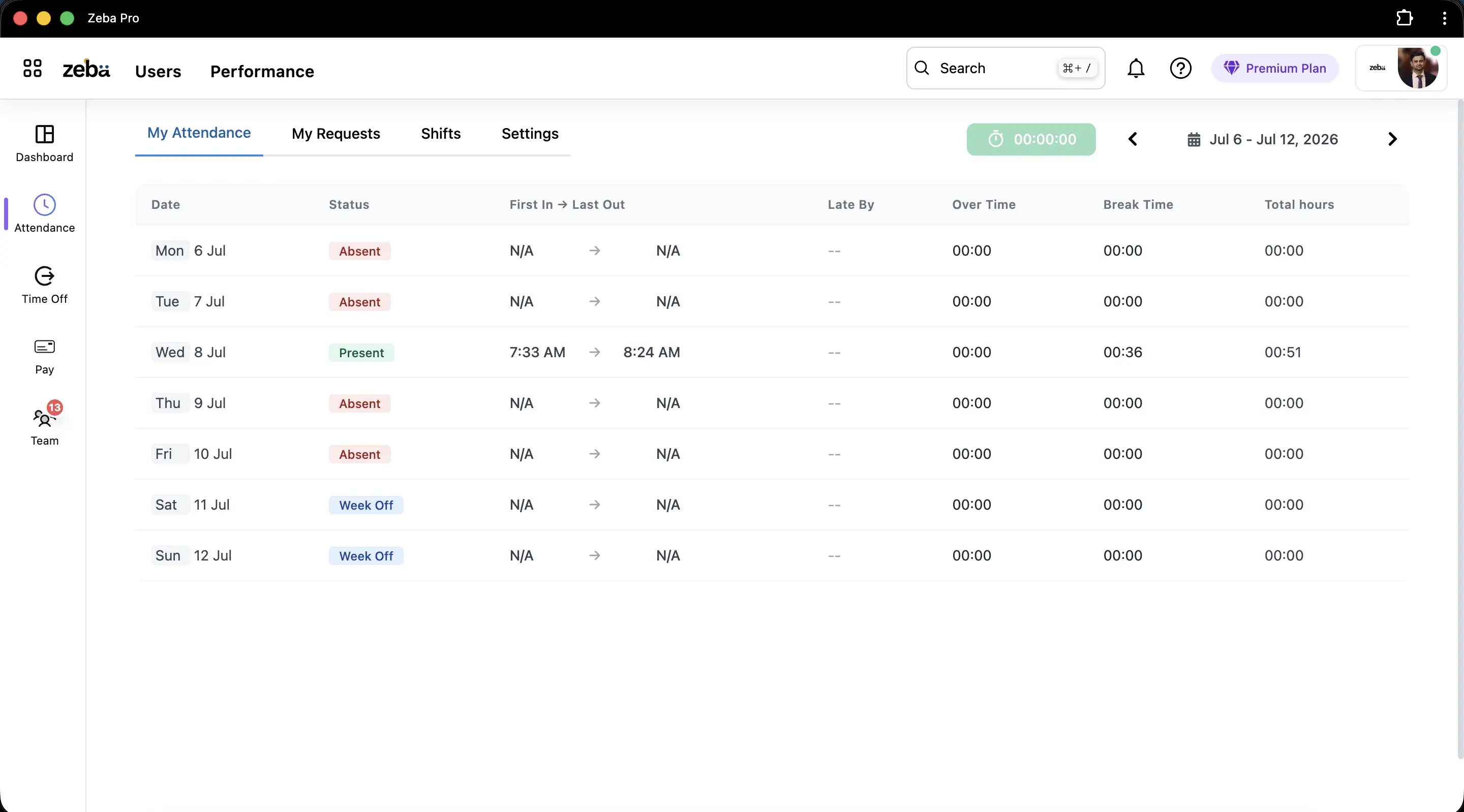
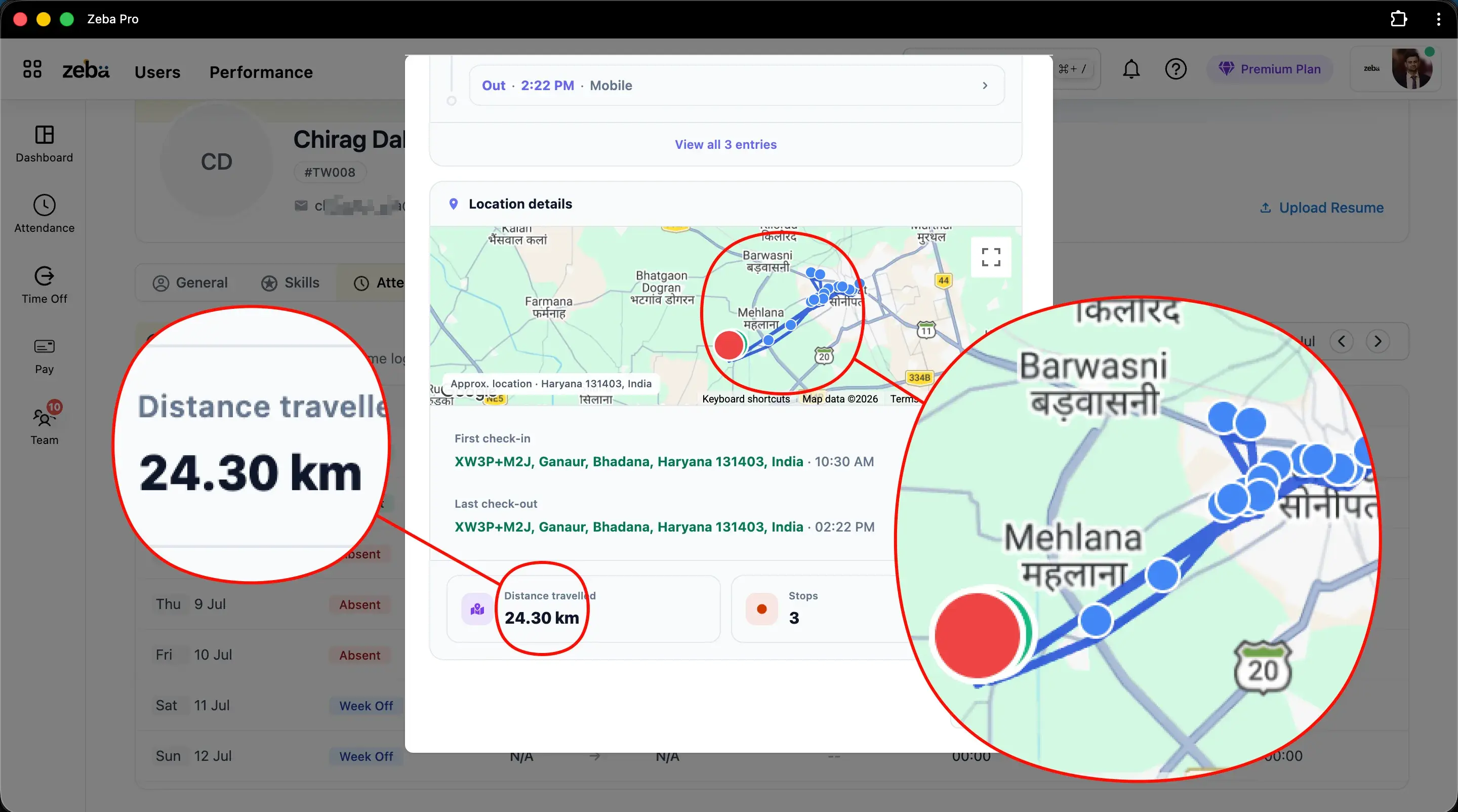
For teams that work away from a desk, a punch is more useful with a place attached. Open any day to see the check-in locations, the route and the distance covered.
- Day detail: check in, check out, late by, overtime, break and total hours for one day.
- Timelogs: every check-in and check-out of the day in order.
- Location: the places of each entry on a map, with distance travelled and stops.
- Geofence: require the punch to happen inside the site boundary where the work is.
Who it is for
Attendance management system for growing companies, branches and field teams.
Zeba suits teams that have outgrown registers and chat groups but do not want a heavy HR project. Pick the description closest to yours.
- HR and operations leads at growing companiesYou own attendance, leave and payroll inputs for a team that keeps growing, and you want rules written once instead of explained every month.Zeba for HR
- Businesses with field and mixed teamsSales, service and delivery staff work away from a desk. You need punches and live location that managers can read without calling anyone.Field force management
- Shift based sites like plants, stores and sitesPeople work in shifts, including nights. You need late marks and overtime to follow the shift and punches to land on the right date.Zeba for manufacturing
Explore the platform
Attendance management by capability.
Use these pages when you need to look closely at one part of the attendance workflow.
Mobile attendance
Check in and out from the Zeba app, with location and live selfie checks where you need them.
Mobile appBiometric attendance
Keep biometric devices where they work, and see every punch in the same timeline as app punches.
BiometricGeofencing
Draw a boundary around each site and require the punch to happen inside it.
GeofencingTime and attendance
Hours, breaks and overtime counted from the punches, by shift.
Time and attendanceShift management
Create shifts, assign people and keep night shift punches on the right date.
ShiftsRegularization
Request, approve and audit corrections to missed punches.
CorrectionsLeave and attendance
Leave, half days and working days counted together.
LeaveAttendance and payroll
Working days and loss of pay passed straight to the payroll run.
PayrollLive location
See where field staff are during working hours, with visits and distance.
Live locationFree attendance sheet
A monthly attendance register in Excel, if you are not ready to switch yet.
Free template
Why not a punch-only tool
Attendance management system vs punch-only tools
Usual approach
With Zeba
Device punch, then Excel
Rules, leave, and LOP in one system
Same rule for every role
Work types for office and field
No night-shift date logic
Shift-date buffers overnight
Separate field tracker
GPS options inside attendance
No audit on corrections
Regularization with approvals
Who uses it
One system, four different days
HR, managers, employees and finance each see attendance differently. Pick your role to see what it looks like.
- HR teamsSet the policy once and assign it by department, location or person.Zeba for HR
- ManagersSee who is in, late or on leave without chasing anyone.Employee attendance
- EmployeesPunch, see your hours and ask for a correction from the phone.Staff attendance app
- FinanceReceive attendance that already carries leave, overtime and loss of pay.Zeba for finance
Explore by industry
Built for teams that run on attendance.
Attendance matters most where people work in shifts, on sites or on the road. These pages show how Zeba fits each.
- ManufacturingShift rosters, night shifts and overtime on the plant floor.Manufacturing
- LogisticsDrivers and delivery staff with live location and distance.Logistics
- ConstructionSite teams with geofenced punches across several sites.Construction
- Real estateSales and site visit teams tracked while they are out.Real estate
Want to see how one day is tracked?
The tracking page follows a single day from the first punch to the payslip, and explains the rules behind it.
All attendance pages
Every part of attendance management
Everything Zeba covers on attendance, grouped by what you are trying to do.
Choose and compare
Capture the punch
Rules and corrections
Into leave and payroll
Got questions?
Frequently Asked Questions
Clear answers on setup, payroll, attendance, and everyday HR with Zeba.
- Zeba is designed for teams that do not want a complicated HRMS. Employees punch from the mobile app or a biometric machine, managers see the record straight away, and payroll uses the same data. Most teams are running without outside help.
- An attendance management system is software that records presence, hours, leave, and exceptions for employees or students. For businesses, it should also apply shift rules and connect to payroll.
- Yes. Zeba is a cloud attendance management system with mobile and web punches, geofence options, and payroll integration for growing teams.
- Yes. Work types decide whether a role needs geofence punches, mobile check-in, or live location during duty - without forcing one surveillance model on everyone.
- Those portals solve a specific biometric login job. Zeba is commercial HRMS attendance: policies, regularization, leave, and salary impact for private employers.
- HR chooses one of two methods in attendance settings: from the first check-in to the last check-out of the day, or by adding up every valid check-in and check-out pair. The choice applies to how total hours, overtime and breaks are worked out.
- Minimum hours decide whether a day counts as a full day or a half day. Strict mode applies the required hours exactly. Lenient mode works against expected hours. You can type the full day and half day durations or take them from the employee's shift.
- Yes. Attendance settings have separate switches to restrict attendance on weekends and on holidays, so punches on those days are blocked when your policy says so.
- Only if you allow it. A setting lets employees update past attendance themselves. When it is off, they raise a regularization request with a reason and a manager approves it.
- Yes. You create shifts with their timings, assign them to people, and late marks and absences are judged against the assigned shift, including shifts that run past midnight.
- Yes. Opening a day shows the check in and check out, late by, overtime, break and total hours, and a location view with the places of each entry, the distance travelled and the stops.
- Payroll reads the same attendance record, including approved corrections, leave and overtime, so loss of pay and working days are not rebuilt in a spreadsheet at month end.
Keep reading
Guides on attendance
- Attendance regularization: meaning, process and policy
- Attendance regularization request mail and policy template
- How to make an attendance sheet in Excel
- Attendance software for manufacturing companies
- Biometric vs mobile attendance for manufacturing workers
- Managing night shift attendance without payroll errors
- 13 HR metrics to track for attendance and time
- Why growing teams still struggle with attendance tracking
Ready when you are
Deploy an attendance management system teams accept
Work-type rules, verified punches, night-shift dates, and payroll-ready attendance - not another login page with no HR logic.