
Part of Attendance management system
Attendance regularization
Attendance regularization that keeps an audit trail
When a punch goes missing, the employee requests a correction, the manager approves it, and the record payroll uses is updated. Every step is kept.
Free trial. No credit card.
Missed punch - requested
Why Zeba
Attendance regularization: the correction that decides pay
Regularization is where attendance disputes start. A request, an approval and an audit trail turn a month-end argument into a record anyone can check.
Attendance regularization is the fix for the day a punch goes missing: the phone was dead, the person forgot to check out, the network dropped at the gate. It matters because the corrected day decides pay. A sloppy process means arguments at month end, and no trail when finance asks why.
A good process has four parts: a request from the employee, a decision by the manager, a limit on what can be changed, and a record of all of it. Zeba does each of these inside attendance tracking, so the correction and the original punch live in the same record.
If you are setting the policy first, start with the regularization request mail and policy template and the regularization process explained. To see where corrections fit in the whole flow, read the attendance management system overview.
Where it goes wrong
What corrections look like without a process
- Corrections sent by message with no record
- Past dates edited by whoever has access
- Changes found after payroll has run
- No answer to why a day changed
Benefits
Attendance regularization that employees, managers and HR can all follow.
A good correction process is quick for the employee, clear for the manager and safe for HR. These are the three things it needs.
Employee
Ask in a minute, see the status.
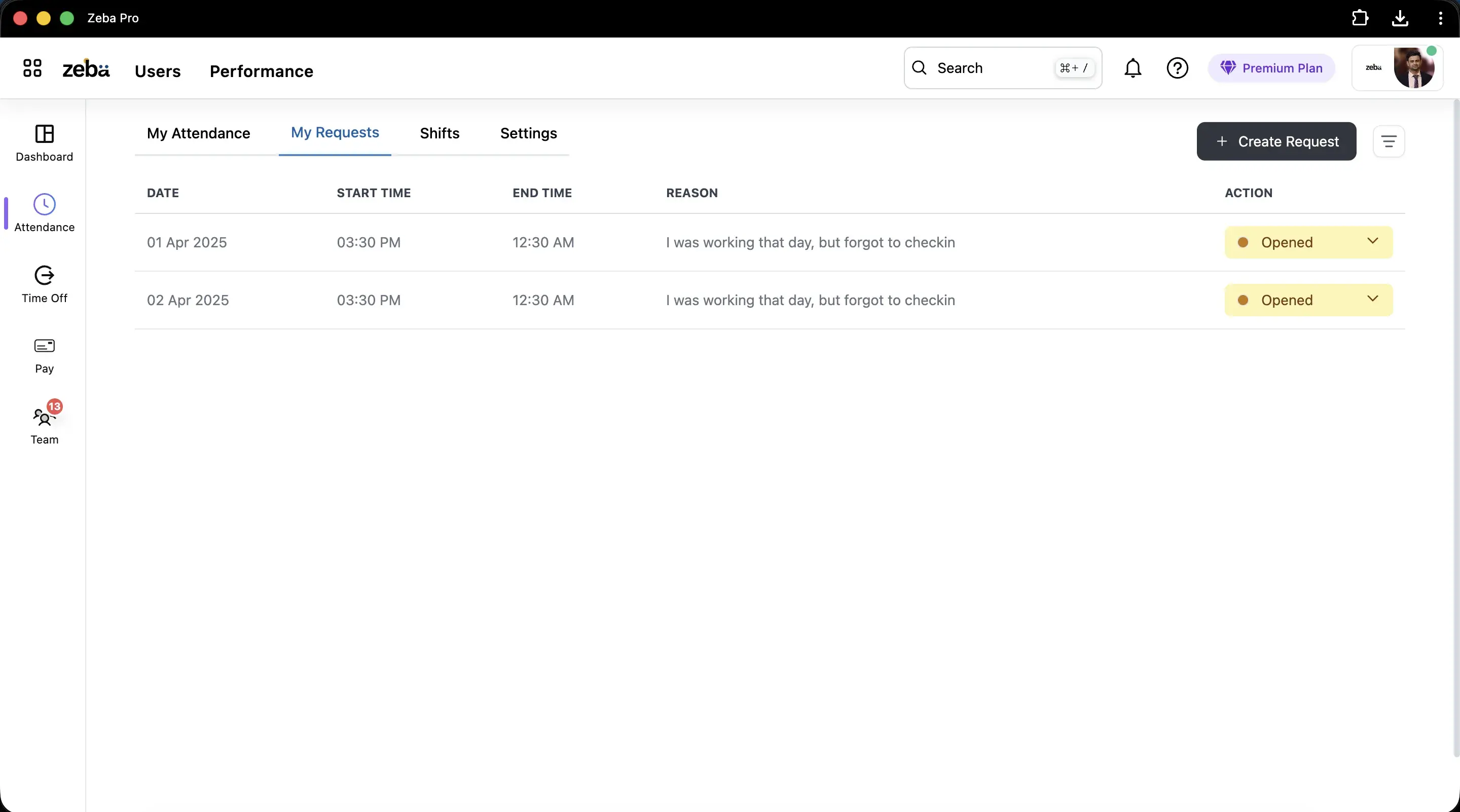
A request has a date, start and end time and a reason. The employee can see whether it is opened, approved or rejected.
Manager
One list of requests to clear.
Requests waiting for approval sit in a list with the details needed to decide, so nothing is lost in a chat.
HR
A record you can defend.
Every change is kept against the day, and a setting decides whether employees can edit their own past attendance.
How it works
How a correction moves through Zeba.
The path is short: request, approve, record. Here is each end of it.
Employee side
Raise a request for a day that went wrong.
The employee creates a request from the requests tab.
- Date and time: the day and the start and end time to apply.
- Reason: why the punch was missed, for example forgot to check in.
- Status: opened until a manager acts on it.
- Limits: future dates cannot be regularized.
Manager side
Approve or reject from one list.
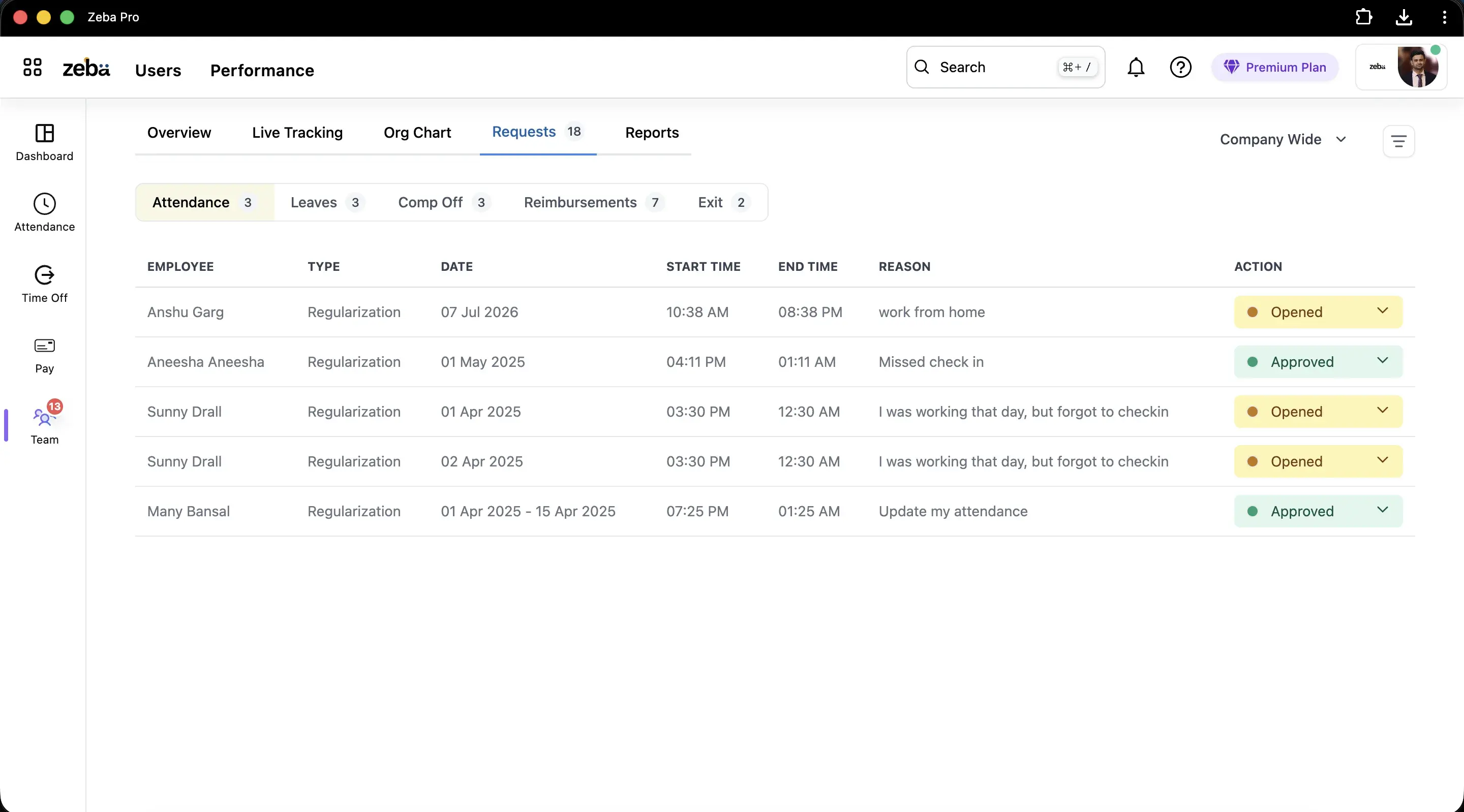
Managers see requests assigned to them for approval.
- Review: date, times and reason in one row.
- Decide: approve or reject.
- Effect: an approved request updates the attendance record.
- History: the outcome stays with the day.
What it includes
What attendance regularization covers in Zeba
Requests for missed punches
Employees raise a request for a missed check-in or a forgotten check-out from the same place they punch.
Manager approval workflow
Requests go to the manager for review through the approval workflow, so a correction is never just a message.
Guardrails on what can change
No regularization for future dates, and HR decides whether employees may update past attendance themselves.
A full audit history
HR can see what was requested, who approved or rejected it, and when. Useful when payroll asks why a day changed.
Corrections that reach payroll
Approved changes update the attendance record payroll uses, so loss of pay follows the corrected day.
Works with your rules
Corrections sit inside the same late-mark, shift and policy rules as ordinary punches.
Compared
Regularization by message vs by request
Usual approach
With Zeba
Corrections by message or email to HR
A request in the app, approved by the manager
No record of who changed a day
Audit history for every request
Past dates edited by anyone
HR decides who can update past attendance
Corrections found after payroll
Approved before payroll locks for the month
Dates filled in ahead of time
No regularization for future dates
The rest of the cluster
Every part of attendance management
This page covers one part of Zeba's attendance system. These cover the rest, grouped by what you are trying to do.
Choose and compare
Capture the punch
Rules and corrections
Into leave and payroll
FAQ
Questions
What is attendance regularization?
Attendance regularization is the process of correcting an attendance record after the fact, for example when an employee forgot to check in or check out. The employee raises a request, a manager approves it, and the record used for payroll is updated.
Which corrections can employees request?
Employees can request a correction for a missed check-in or a forgotten check-out. The request goes to the manager for review through the approval workflow.
Can employees regularize a future date?
No. Zeba does not allow regularization for future dates, which stops attendance being filled in before the day has happened.
Does regularization change payroll?
Yes. An approved correction updates the attendance record that payroll uses, so working days and loss of pay follow the corrected record. Make sure corrections are approved before payroll is locked for the month.
Who approves a regularization request?
Managers review requests through approval workflows. HR keeps a full audit history of who requested what and who approved or rejected it.
Can employees update their own past attendance without approval?
That is a setting. HR can allow employees to update past attendance, or keep every correction behind a request and an approval. Most teams keep approval on, because it gives the audit trail.
Is regularization the same as leave?
No. Leave records planned or approved time off. Regularization corrects a record when someone was present, or should be treated as present, but the punch is missing or wrong.
Where do employees raise a regularization request?
In the requests tab of their attendance screen, where they choose the date and times and give a reason.
Who approves a request?
A manager. Requests waiting for approval are listed for the approver.
Can HR see what was changed?
Yes. The outcome of each request is kept against the day as part of the audit trail.
Run attendance corrections with an audit trail
Requests, approvals and a full history, inside the attendance record that payroll uses.