
Part of Attendance management system
Attendance management software
Attendance management software with rules you set once
A few settings decide who is present, late or on a half day. Everyone gets the same answer, so nobody has to be the referee.
Free trial. No credit card.
Why teams switch
Monday should not start with last Friday.
HR
Stop rebuilding the month.
Late marks and half days follow rules you set once, not a sheet you repair on the 28th.
Managers
Stop being the referee.
The rule decides. Nobody argues with a setting the whole company can see.
Owners
See what payroll sees.
The record you check is the one that feeds attendance and payroll.
The rules
Four choices decide every day.
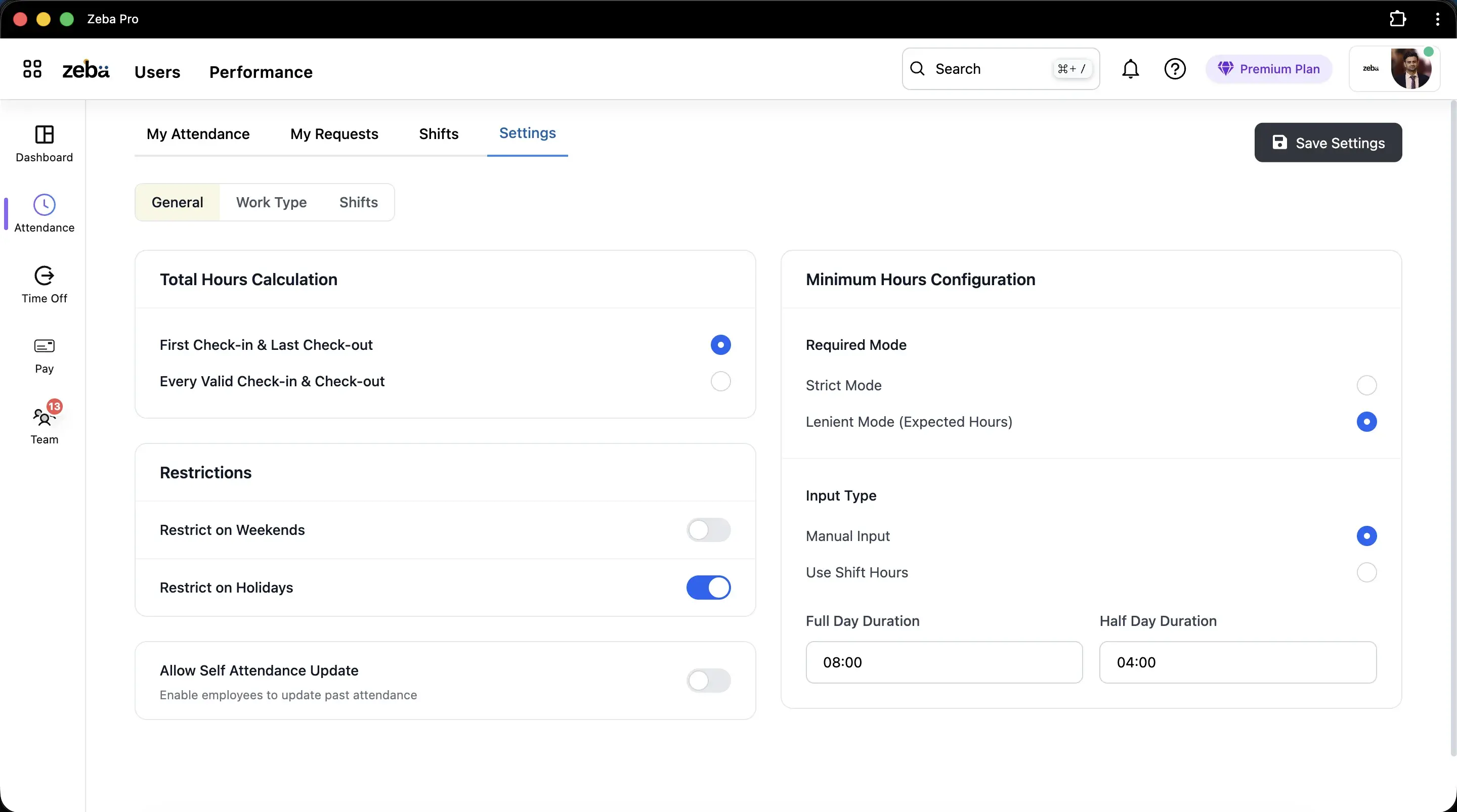
These live under Attendance, then Settings. You set them once for the company.
Strict or lenient
Strict judges the hours worked. Lenient judges the check-in. Try both on time and attendance software.
Full day and half day
Type the hours yourself, or take them from each person's shift.
How hours are counted
First check-in to last check-out, or add up every valid pair.
Weekends and holidays
Choose whether punches are blocked on those days.
Getting started
Three steps to your first clean month.
Step 1
Choose the rules
Pick the four settings above and a grace period, so five minutes is not a late mark.
Step 2
Add people and shifts
Create shifts and give each person a work type. See shift management for night and rotating shifts.
Step 3
Turn on punching
Staff use the mobile attendance app. Missed one? They raise a regularization request.
Before you buy
Ask every vendor these six things.
Who decides what counts as late?
A rule you can open and read, or a manager's memory?
What happens to a missed punch?
There should be a request, an approver and a record of who approved.
Does a night shift land on the right date?
A shift that ends after midnight should still belong to the day it started.
Where does the record go next?
If payroll is a separate export, you will rebuild the month anyway.
What can staff see?
Their own days and their own requests, nothing more.
What can it not do?
Ask. Zeba, for one, trusts the phone's location and does not match faces.
Got questions?
Frequently Asked Questions
Clear answers on setup, payroll, attendance, and everyday HR with Zeba.
- Check how it decides late and half days, what happens to a missed punch, whether night shifts land on the right date, and whether the record feeds payroll without an export. A demo on your own shifts answers most of it.
- Strict or lenient mode, full day and half day hours, how hours are counted, whether weekends and holidays block punches, and your grace period. Zeba keeps all of these in Attendance, then Settings.
- Mostly the words are used interchangeably. For the whole picture, from punch to payslip, see the attendance management system.
- They raise a request with the date, times and a reason, and their manager approves or rejects it. You can also allow self update of past attendance, which is off by default.
- Zeba is built for teams of 5 to 500 people, and the same four settings apply whether you have ten staff or four hundred.
Ready when you are
Set the rules once
Book a demo and we will walk through the settings on your own shifts.